Samsung UHD Monitor Comparison: Choosing the Right Screen for Your Home
Selecting an ultra-high-definition desktop display involves weighing workspace dimensions, visual fidelity, and daily practicality. When evaluating a family computer display or a shared workstation screen, high pixel density transforms everyday reading, photo viewing, homework assignments, and spreadsheet navigation. Selecting a display requires evaluating how easily multiple users can switch between work tasks, casual browsing, and…
As Amazon Associates, we earn from qualifying purchases. This means we may receive a small commission at no extra cost to you if you click through and make a purchase.
Selecting an ultra-high-definition desktop display involves weighing workspace dimensions, visual fidelity, and daily practicality. When evaluating a family computer display or a shared workstation screen, high pixel density transforms everyday reading, photo viewing, homework assignments, and spreadsheet navigation. Selecting a display requires evaluating how easily multiple users can switch between work tasks, casual browsing, and evening entertainment without navigating complex setting menus.
Samsung organizes its ultra-high-definition lineup into distinct equipment tiers tailored to specific computing roles. The ViewFinity line emphasizes color balance, panel clarity, and eye comfort for extended daily productivity. The UJ series delivers expansive screen real estate with legacy multitasking tools for conventional desktop stations. Meanwhile, the M-series Smart Monitors combine regular PC input capabilities with onboard television streaming, IoT automation, and cloud gaming. At the ultra-enthusiast tier, the Odyssey Neo family introduces extreme curvature, dual-panel resolutions, and rapid refresh rates. Reviewing this comprehensive samsung 27 inch monitor comparison helps clarify which samsung uhd monitor to buy based on your household habits and desk space.
Samsung UHD Monitors Lineup at a Glance
| Model | Screen Size & Panel | Resolution & Refresh Rate | Key Connectivity | Primary Focus |
|---|---|---|---|---|
| Samsung 27″ ViewFinity S7 | 27-inch IPS (Matte) | 3840 x 2160, 60Hz | HDMI, DisplayPort | Home office productivity & desktop ergonomics |
| SAMSUNG 32″ UJ59 Series 4K UHD | 31.5-inch VA/LED (Flat) | 3840 x 2160, 60Hz | HDMI, DisplayPort | Multi-device windowing & media upscaling |
| Samsung 32″ ViewFinity S7 | 32-inch IPS (Matte) | 3840 x 2160, 60Hz | HDMI, DisplayPort | High-detail design & broad viewing angles |
| Samsung 43” M7 | 43-inch LED (Glossy) | 3840 x 2160, 60Hz | USB-C, HDMI, USB-A | Smart home management & large-format streaming |
| Samsung 32”M7 | 32-inch LED (Matte) | 3840 x 2160, 60Hz | USB-C, HDMI, USB-A | All-in-one workstation & cloud gaming |
| Samsung 57″ Odyssey Neo G9 | 57-inch Curved VA (1000R) | 7680 x 2160 (Dual UHD), 240Hz | DisplayPort 2.1, HDMI 2.1, USB | Immersive panoramic gaming & ultra-wide workflows |
Figures in this table come from the write-up and the product pages it links to.
The Models in Detail

Model 01 of 06
Samsung 27" ViewFinity S7
Average rating left by Amazon buyers Mostly positive
What the listing highlights
- SAMSUNG’S 27″ VIEWFINITY S7 (S70H) HIGH-RESOLUTION MONITOR: Delivers exceptional productivity
- 4K UHD (3840X2160) RESOLUTION WITH HIGH PIXEL DENSITY: Reveals greater levels of detail
- HDR10 Optimizes contrast, offering a gamut of accurate colors with darker blacks and brighter highlights for engaging content
What to check on the listing
- No Prime badge on this listing.
Both columns are read from the Amazon product page. Nothing here comes from hands-on use.
Best for Compact home desks needing sharp text
Pros
- High pixel density IPS display
- Samsung Display Manager software
- TÜV-certified Eye Saver Mode
Cons
- 60Hz refresh rate ceiling
- Modest 300 cd brightness
The Samsung 27″ ViewFinity S7 serves as a compact, sharp solution tailored for home offices with modest desk footprints. Its 27-inch IPS panel packs a 3840 x 2160 4K UHD resolution, producing dense, crisp text and clean borders across documents and web browsers. A matte screen finish pairs with a 3000:1 contrast ratio and 300 cd/m2 brightness rating, keeping reflections minimal when placed near home office windows. The display also incorporates HDR10 processing, which optimizes contrast by delivering darker blacks alongside brighter highlights to maintain visual depth across various types of media content.
For individuals spending hours reading digital text or sorting through accounting spreadsheets, TÜV-certified eye comfort engineering plays an active role. The integrated Eye Saver Mode reduces blue light output while flicker-free technology prevents screen pulsing that often leads to visual fatigue. Visual management is further streamlined through Samsung Display Manager software, giving users straightforward access to split-screen arrangements, calibration settings, and Picture-in-Picture (PIP) or Picture-by-Picture (PBP) modes. With broad 178-degree viewing angles and reliable HDMI and DisplayPort inputs, this screen suits students and remote professionals who want dense clarity without occupying the entire tabletop.
While the display excels at precision document viewing, its 60Hz refresh rate and standard port selection target steady desktop work rather than hyper-fast action. Users seeking wider viewing areas or integrated television streaming apps will find more flexibility transitioning to larger ViewFinity variants or the Smart Monitor series.

Model 02 of 06
SAMSUNG 32" UJ59 Series 4K UHD
Average rating left by Amazon buyers Mostly positive
What the listing highlights
- WIDESCREEN UHD With 4x the pixels of Full HD, get more screen space (vs 16:9 screen) and UHD images; View documents & webpages w/ less scrolling, work more comfortably w/ multiple windows…
- A BILLION COLOR SHADES Supporting a billion shades of color, the UJ59 delivers incredibly vivid and realistic images; Its color accuracy means colors appear true to life, making the UJ59 ideal for photo, video…
- SEAMLESS UPSCALING Samsung’s UHD upscaling technology includes signal analysis and detail enhancement that seamlessly upconverts SD, HD and Full HD content to near UHD-level picture quality
What to check on the listing
- No Prime badge on this listing.
- Sold by Amazon Resale; the listing does not show Amazon fulfilment.
Both columns are read from the Amazon product page. Nothing here comes from hands-on use.
Best for Everyday multitasking across dual PC setups
Pros
- Picture-by-Picture dual device support
- UHD upscaling technology
- AMD FreeSync tear reduction
Cons
- Standard 270 cd brightness
- Lacks HDR contrast support
The SAMSUNG 32″ UJ59 Series 4K UHD expands visual space to 31.5 inches, giving families a generous visual canvas for computing and media playback. Offering four times the pixel count of standard Full HD screens, this model presents over 8.3 million pixels and supports one billion color shades for realistic color reproduction. An integrated UHD upscaling engine analyzes lower-resolution input signals, adding detail enhancement to convert standard-definition, HD, and Full HD feeds into near-UHD image clarity on the screen.
Multitasking capabilities remain a key pillar of this monitor. Through hardware-based Picture-by-Picture, users can connect two separate input devices simultaneously, maintaining each device’s native resolution across split halves of the display. Picture-in-Picture allows a second video source to be resized up to 25 percent of the screen and positioned anywhere across the workspace. Gamers in the household benefit from AMD FreeSync, which synchronizes graphics card frame delivery with the panel to reduce visual stutter, alongside a dedicated Game Mode and Low Input Lag Mode to accelerate control responses.
Framed by slim bezels and resting on a metallic Y-shaped stand, the UJ59 presents a clean look on family desks. However, its 270 cd brightness and absence of high-dynamic-range certification make it better suited for controlled ambient lighting rather than sunlit rooms, leading users with bright environments toward higher-luminance models.

Model 03 of 06
Samsung 32" ViewFinity S7
Average rating left by Amazon buyers Mostly positive
What the listing highlights
- Samsung’s 32″ ViewFinity S7 (S71H) 4K UHD Monitors provide exceptional clarity for professionals across all industries
- 4K UHD (3840 x 2160 resolution) delivers visual excellence with high pixel density which reveals greater levels of detail and accurate color representation
- More screen space enables the creation of intricate designs, complex diagrams, and dynamic video content
What to check on the listing
- No Prime badge on this listing.
Both columns are read from the Amazon product page. Nothing here comes from hands-on use.
Best for Creative work demanding wide color viewing
Pros
- Wide viewing angle IPS panel
- HDR10 contrast optimization
- TÜV eye comfort technology
Cons
- Standard 60Hz refresh rate
- 1000:1 contrast ratio
Designed for professionals who handle fine graphic assets, detailed schematics, and extended research, the Samsung 32″ ViewFinity S7 combines an expansive 32-inch diagonal screen with an IPS panel. The wide 178-degree horizontal and vertical viewing angles prevent color washout or contrast shift when viewing the monitor from off-center angles. With HDR10 processing and support for over one billion colors, the screen produces balanced color gradients and dependable shadow differentiation across photo catalogs and video timelines.
Physical usability centers around user comfort and seamless peripheral management. The panel sports a matte screen finish to diffuse overhead room glare, while TÜV-certified Eye Saver Mode minimizes blue light emissions during late-night study sessions. The rear connection bay provides straightforward DisplayPort and HDMI jacks, making it easy to dock a family laptop alongside a permanent desktop tower. When evening downtime arrives, the integrated Game Mode dynamically adjusts contrast and color settings to reveal hidden elements in darker scenes.
Unlike entertainment-oriented monitors, this model avoids smart software layers, focusing strictly on stable, uncompressed desktop output with a 1000:1 contrast ratio and 300 cd/m2 brightness. It serves as an ideal step up for users who love the sharpness of the 27-inch model but need extra diagonal space for complex side-by-side document editing.

Model 04 of 06
Samsung 43” M7
Average of 378 Amazon buyer ratings Mostly positive
What the listing highlights
- INSTANT ACCESS TO YOUR FAVORITE STREAMING CONTENT: Stream content directly from your monitor, or tune into Samsung TV Plus to get live channels and on-demand content.¹
- OPTIMALLY TAILORED VISUALS WITH AI Experience optimal picture quality adjusted to your needs.² AI Picture Optimizer adapts the visuals to help you work on documents with comfort, get fully immersed in games with deep and…
- SIMPLE CONTROL FOR YOUR SMART HOME: See your smart home devices in a 3D Map View and manage them with ease.³ You can also check the energy usage and cost…
What to check on the listing
- No Prime badge on this listing.
Both columns are read from the Amazon product page. Nothing here comes from hands-on use.
Best for Shared rooms doubling as media hubs
Pros
- Massive 43-inch screen size
- Integrated streaming apps and TV Plus
- Single-cable USB-C connectivity
Cons
- Glossy screen finish reflects glare
- 60Hz refresh rate ceiling
The Samsung 43” M7 bridges the gap between an oversized computer workstation and a dedicated family room smart television. Built with a 43-inch LED panel delivering 4K UHD resolution, this display features an impressive 5000:1 contrast ratio that brings exceptional depth to dark video scenes and presentation slides. A glossy panel coating enhances visual punch and vibrant color saturation across its 300 cd brightness output, making media content feel lively and engaging.
What sets this unit apart is its complete standalone operating environment. Users can stream shows directly via native Smart TV applications or view live channels through Samsung TV Plus without turning on a computer. Samsung Knox security protects local device data and Internet of Things connections, while SmartThings integration displays connected home appliances in an interactive 3D Map View with energy monitoring. The built-in Active Voice Amplifier analyzes ambient noise within the room, boosting dialogue volume dynamically so viewers can hear speech clearly even over kitchen or household noise.
Connectivity is streamlined through a versatile USB-C interface that handles video transmission, high-speed data, and host device charging simultaneously alongside standard HDMI and USB-A ports. Because of its massive 43-inch footprint and glossy finish, this model demands a deep desk or a shared family room wall, making it excessive for tight office corners.

Model 05 of 06
Samsung 32”M7
Average rating left by Amazon buyers Very positive
What the listing highlights
- INSTANT ACCESS TO YOUR FAVORITE STREAMING CONTENT: Stream content directly from your monitor, or tune into Samsung TV Plus to get live channels and on-demand content.¹
- OPTIMALLY TAILORED VISUALS WITH AI Experience optimal picture quality adjusted to your needs.² AI Picture Optimizer adapts the visuals to help you work on documents with comfort, get fully immersed in games with deep and…
- SIMPLE CONTROL FOR YOUR SMART HOME: See your smart home devices in a 3D Map View and manage them with ease.³ You can also check the energy usage and cost…
What to check on the listing
- No Prime badge on this listing.
Both columns are read from the Amazon product page. Nothing here comes from hands-on use.
Best for Bedrooms needing streaming and PC utility
Pros
- Built-in Samsung Gaming Hub
- Active Voice Amplifier technology
- SmartThings home management integration
Cons
- 72 percent color gamut rating
- 60Hz refresh rate ceiling
Providing the smart convenience of the M-series in a standard desktop format, the Samsung 32”M7 fits neatly on typical home desks while doubling as a media hub. It features a 32-inch 4K UHD display with a matte screen finish, 3000:1 contrast ratio, and 300 cd brightness. The matte treatment diffuses harsh reflections from table lamps, ensuring comfortable viewing during daytime telecommuting or late-evening homework sessions.
The monitor integrates AI Picture Optimizer technology, which evaluates onscreen content to automatically calibrate picture parameters for text readability or cinematic contrast. Smart functionality mirrors larger entertainment hubs, offering direct streaming apps, Samsung TV Plus, and Knox-secured SmartThings home automation. For recreation, the Samsung Gaming Hub allows users to stream cloud-based games directly through the monitor using paired Bluetooth controllers, eliminating the need for a gaming console or high-end graphics card.
With Click to Search features that let users discover background details on actors or shows with a single button press, and Active Voice Amplifier maintaining speech clarity, this screen acts as an independent appliance. While its 72 percent color gamut rating is narrower than the ViewFinity series, its blend of PC connectivity and television versatility makes it a standout choice for student bedrooms and shared multipurpose rooms.
Model 06 of 06
Samsung 57" Odyssey Neo G9
Average rating left by Amazon buyers Very positive
What the listing highlights
- WORLD'S 1ST DUAL UHD MONITOR 57″ DUHD resolution brings you a display as wide as 2 UHD monitors with incredibly detailed, pin-sharp images and a wide field of view; See more of the action and…
- WRAP YOURSELF IN ADVENTURE Experience the next level of heart-pounding gaming with even more intensity as the vivid scenes wrap around you
- 240HZ and 1ms (GTG) w/ DP 2.1 INPUT: 240Hz refresh rate reduces lag; 1ms (GTG) response time and minimized ghosting enables you to game with precision; All new DisplayPort 2.1…
What to check on the listing
- No Prime badge on this listing.
Both columns are read from the Amazon product page. Nothing here comes from hands-on use.
Best for Dedicated simulation and ultrawide immersion
Pros
- Massive Dual UHD 57-inch curved display
- Fluid 240Hz refresh rate with DP 2.1
- Quantum Mini LED with 2,392 dimming zones
Cons
- Substantial desktop footprint required
- Demands high-end graphics hardware
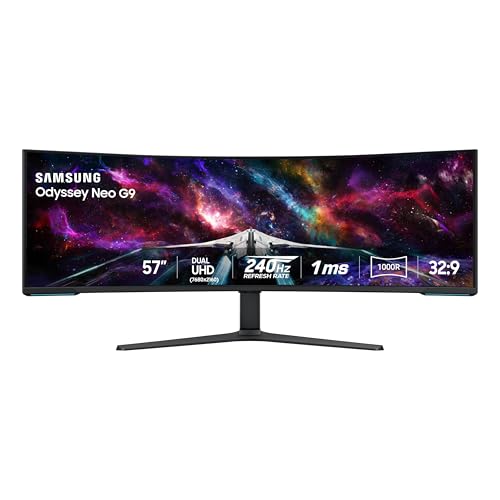
At the apex of immersive desktop hardware sits the Samsung 57″ Odyssey Neo G9, a monumental display engineered for demanding simulation rigs, serious gaming, and extensive visual multitasking. Boasting the world’s first Dual UHD resolution of 7680 x 2160 across an ultra-wide 32:9 aspect ratio, this 57-inch display provides the equivalent screen area of two 32-inch UHD monitors positioned side by side, completely devoid of center bezel interruptions. Exploring a premium samsung curved monitor illustrates how an aggressive 1000R curvature aligns with the natural human field of view.
Under the surface, Quantum Matrix Technology powers 2,392 local dimming zones using Quantum Mini LEDs. This architectural design yields a 1,000,000:1 contrast ratio, 12-bit black level precision, and VESA DisplayHDR 1000 certification with 1,000-nit peak highlights. Motion handling is exceptionally rapid, driven by a 240Hz refresh rate, 1ms gray-to-gray response time, and AMD FreeSync Premium Pro synchronization. Cutting-edge connectivity includes DisplayPort 2.1 alongside HDMI 2.1 and an integrated USB hub, maintaining full bandwidth for high-frame-rate rendering.
Atmospheric CoreSync lighting projects on-screen palette colors onto rear walls to expand visual ambiance into the room. Shoppers who previously evaluated an enthusiast samsung odyssey 40 inch display will find the Neo G9 on another level entirely. Its immense size and power requirements necessitate heavy-duty desks and cutting-edge graphics hardware capable of driving 16.5 million pixels smoothly.
Matching a Model to Your Setup
- Compact Study Desks: Choose the Samsung 27″ ViewFinity S7 for dense, crisp text rendering and certified eye comfort software that fits neatly into space-restricted rooms.
- Budget-Friendly Dual-PC Workstations: Select the SAMSUNG 32″ UJ59 Series 4K UHD to route two computers simultaneously across one expansive 31.5-inch panel using Picture-by-Picture.
- Color-Conscious Graphic Workspaces: Opt for the Samsung 32″ ViewFinity S7 to benefit from broad IPS viewing angles, wide HDR10 color gradation, and glare-reducing matte glass.
- Multipurpose Family Living Areas: Deploy the Samsung 43” M7 when you require a large hybrid screen that operates as a high-resolution PC monitor by day and an IoT-ready streaming television by night.
- Student Dorms and Combined Bedrooms: Pick the Samsung 32”M7 for built-in cloud gaming via Samsung Gaming Hub and standalone smart streaming apps without connecting a PC tower.
- High-End Flight Simulation and Panoramic Multitasking: Invest in the Samsung 57″ Odyssey Neo G9 to replace dual-monitor setups with an ultra-wide, seamless 240Hz Quantum Mini LED curved canvas.
Before You Buy
Reviewing monitor product specifications requires careful attention to what is included in the packaging and what details the listings leave unstated. Several of these listings do not specify the exact video cable versions provided in the retail box, such as whether a high-bandwidth DisplayPort 2.1 cable comes with the 57-inch Neo G9 or if standard HDMI cables are supplied with the ViewFinity models. Furthermore, stand ergonomics vary significantly across product tiers; standard models like the UJ59 feature fixed or tilt-only stands, while listings do not detail height-adjustment or portrait-pivot ranges unless an aftermarket VESA mount is utilized.
Physical desk space and host PC hardware compatibility must also be evaluated before finalizing a purchase. Operating a Dual UHD 7680 x 2160 screen at 240Hz requires a modern graphics card equipped with DisplayPort 2.1 or HDMI 2.1 to achieve maximum resolution and fluid frame rates without bandwidth throttling. Additionally, viewing a 43-inch display or an ultra-wide 57-inch curved frame up close can cause neck strain if your desk lacks sufficient depth, making proper room planning essential for long-term comfort.
FAQ
What makes Samsung ViewFinity monitors different from M-Series Smart Monitors?
The ViewFinity series focuses on traditional desktop computing, emphasizing IPS panel accuracy, high pixel density, matte anti-glare coatings, and eye comfort certifications for graphic design and document editing. In contrast, M-Series Smart Monitors integrate built-in operating software, onboard speakers, Smart TV streaming applications, SmartThings IoT management, and cloud gaming hubs that function independently without requiring a connected computer.
Can you display two different computers on the same Samsung screen simultaneously?
Yes, models like the SAMSUNG 32″ UJ59 Series 4K UHD and the Samsung 27″ ViewFinity S7 include Picture-by-Picture (PBP) functionality. This feature divides the desktop display area, allowing two separate computer sources to feed into the monitor via HDMI and DisplayPort while maintaining their native visual output simultaneously.
Does the Samsung 32” M7 Smart Monitor require a computer to watch movies?
No, the Samsung 32” M7 functions as an independent entertainment display. It features integrated Wi-Fi connectivity and onboard Smart TV apps, giving users direct access to major streaming platforms and live television channels via Samsung TV Plus without waking up or connecting a desktop PC or laptop.
Is an ultra-wide curved screen suitable for ordinary home office tasks?
A monitor like the Samsung 57″ Odyssey Neo G9 provides an immense 32:9 desktop canvas that effectively replaces two separate 32-inch UHD monitors. Its gentle 1000R curve brings the outer edges into natural peripheral vision, enabling multiple full-size application windows, chat feeds, and reference materials to sit open simultaneously without any bezel seams in the middle.
Why does panel finish matter when choosing a home UHD monitor?
Matte finishes, such as those found on the ViewFinity models and the 32-inch M7, diffuse ambient light to prevent distracting reflections in sunlit rooms or offices with strong overhead lights. Glossy screens, found on models like the 43-inch M7, provide punchy contrast and deeper black levels but require careful positioning away from direct light sources to prevent noticeable screen glare.