The Best ASUS Touchscreen Monitors for Versatile Family Desks
Finding the right asus touch screen monitor for a busy household requires balancing physical desk dimensions, intuitive multi-touch responsiveness, and versatile connectivity for everyday family tasks. Shared family desks often host homework assignments, remote work projects, and casual entertainment throughout the week. Choosing between a stationary desktop monitor with an ergonomic base and a travel-friendly…
As Amazon Associates, we earn from qualifying purchases. This means we may receive a small commission at no extra cost to you if you click through and make a purchase.
Finding the right asus touch screen monitor for a busy household requires balancing physical desk dimensions, intuitive multi-touch responsiveness, and versatile connectivity for everyday family tasks. Shared family desks often host homework assignments, remote work projects, and casual entertainment throughout the week. Choosing between a stationary desktop monitor with an ergonomic base and a travel-friendly external display depends entirely on how your household shares work areas and electronic equipment.
The ASUS touchscreen lineup is organized into distinct categories tailored to specific work habits and environments. Dedicated desktop displays emphasize structural stability, multi-finger gesture control, and comprehensive eye comfort certifications for shared study spaces. Specialized sub-brands address focused demands, offering precision stylus input for digital artists or ultra-wide auxiliary layouts for system monitoring. Meanwhile, the mobile ZenScreen series delivers portable productivity through foldable frames, multi-angle kickstands, and single-cable laptop connections. Conducting a thorough asus touchscreen monitor comparison ensures you select the right form factor for your household setup.
ASUS Touchscreen Monitors Lineup at a Glance
| Model | Display Specs | Connectivity | Stand Adjustments | Key Feature |
|---|---|---|---|---|
| ASUS VT229H | 21.5-inch 1080p FHD IPS | HDMI, VGA | Tilt stand, VESA mountable | 10-point touch for desktop workstations |
| ASUS BE24ECSBT | 23.8-inch 1080p FHD IPS | USB-C (80W PD), HDMI, DisplayPort in/out | Tilt, swivel, pivot, 130mm height | Full ergonomic base with laptop docking |
| ASUS ProArt PA169CDV | 15.6-inch 4K UHD IPS | USB-C | Dual integrated kickstands | Bundled ProArt Pen with Wacom EMR technology |
| ASUS ROG Strix XG129C | 12.3-inch 1920×720 IPS | Dual USB-C (20W PD), HDMI 1.2 | Low-profile secondary desktop placement | 24:9 aspect ratio and ROG SensorPanel support |
| ASUS ZenScreen MB169CK | 15.6-inch 1080p FHD IPS | Dual USB-C, mini-HDMI | 360-degree kickstand, tripod socket | 0.78kg lightweight travel frame |
| ASUS ZenScreen Duo MB14FCD | Dual 14-inch 1920×1200 IPS | Dual USB-C, mini-HDMI | 360-degree folding hinge, kickstand | Dual-panel workspace with power pass-through |
Figures in this table come from the write-up and the product pages it links to.
The Models in Detail

Model 01 of 06
ASUS VT229H 22 Inch 1080P FHD
Average rating left by Amazon buyers Overwhelmingly positive
What the listing highlights
- Multi-Touch Display 21.5″ Full HD with 10-point multi-touch capacity, suitable for any application that involves virtual keyboard or multi-touch functionality for business use
- Wide Viewing Angles Stunningly wide 178 viewing angles and vivid, colorful displays with IPS panel technology
- Frameless Design Frameless design makes it suitable for almost-seamless multi-display setups
What to check on the listing
- No Prime badge on this listing.
Both columns are read from the Amazon product page. Nothing here comes from hands-on use.
Best for Budget family desks needing legacy ports
Pros
- Responsive 10-point multi-touch
- HDMI and legacy VGA video inputs
- Three-year replacement warranty
Cons
- Moderate 250 cd/m² brightness
- No USB-C connectivity
The ASUS VT229H 22 Inch 1080P FHD is a stationary desktop display featuring a 21.5-inch Full HD In-Plane Switching panel. It provides responsive 10-point multi-touch capacity, making it suitable for educational applications, navigation, and typing on virtual keyboards. The frameless IPS screen delivers consistent visuals across wide 178-degree viewing angles, while its matte finish helps reduce reflections from overhead study lamps.
Connectivity on this unit includes HDMI and legacy VGA ports, ensuring compatibility with modern family computers as well as older desktop towers. Built-in ASUS Eye Care technology incorporates TÜV Rheinland-certified flicker-free backlighting and low blue light filtering to minimize eye strain during long homework sessions. The display operates at a 60Hz refresh rate, offers a 250 cd/m² brightness level, and includes VESA wall-mount compatibility alongside a 3-year warranty with advanced replacement service.
This monitor suits families seeking a durable, touch-interactive desktop display for kitchen counters, shared student study desks, or home office terminals. However, it lacks integrated USB-C docking and height adjustments, meaning users who require full ergonomic flexibility will prefer the more adaptable BE24ECSBT.

Model 02 of 06
ASUS BE24ECSBT 24 Inch 1080P Touchscreen
Average rating left by Amazon buyers Overwhelmingly positive
What the listing highlights
- Full HD Frameless Display 23.8-inch Full HD (1920 x 1080) frameless IPS panel with wide viewing angles
- Multi-Touch Capability 10-point multi-touch capacity delivers a smooth and intuitive touch experience
- Extensive Connectivity Options Extensive connectivity with USB-C with power delivery, HDMI, DisplayPort in and out for daisy-chain, Earphone jack and USB hub for the most flexibility
What to check on the listing
- No Prime badge on this listing.
Both columns are read from the Amazon product page. Nothing here comes from hands-on use.
Best for Ergonomic home offices and study stations
Pros
- Full ergonomic height and pivot adjustment
- USB-C port with 80W power delivery
- DisplayPort daisy-chain and USB hub
Cons
- Heavier desktop footprint
The ASUS BE24ECSBT 24 Inch 1080P Touchscreen is built for demanding home office setups and multi-user family desks. It features a 23.8-inch Full HD frameless IPS panel with 10-point multi-touch capability optimized specifically for Windows 11 and Windows 10. The display delivers a smooth 75Hz refresh rate, 100% color gamut coverage, and a brightness rating of 300 cd/m² or higher for crisp document reading.
What sets this unit apart is its extensive connectivity and ergonomic base. The stand allows +35 to -5 degrees of tilt, 180 degrees of swivel, 90 degrees of pivot, and 130mm of height adjustment so every family member can find a comfortable viewing posture. Its single USB-C port supports laptop docking with data transfer, video signaling, and up to 80W of power delivery over one cable. Additional ports include HDMI, DisplayPort input and output for daisy-chaining multiple displays, an integrated USB hub, and an earphone jack.
This model is ideal for households where parents work from home and children complete school projects on the same desk. Its broad ergonomic adjustments and one-cable laptop charging provide long-term convenience, though its substantial desktop footprint gives way to mobile alternatives like the ZenScreen line if workspace is limited.
Model 03 of 06
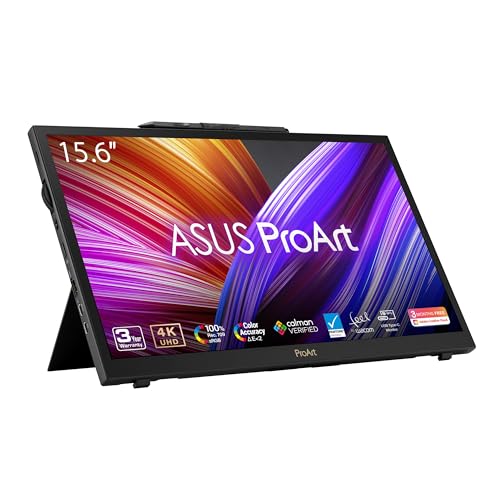
ASUS ProArt PA169CDV 15.6 Inch 4K
Average rating left by Amazon buyers Very positive
What the listing highlights
- High-Resolution Display 15.6-inch 4K UHD (3840 x 2160) IPS panel with anti-glare and capacitive 10-point multitouch
- Professional Pen Technology Bundled ProArt Pen with Wacom EMR technology for pen-on-paper-like writing and drawing experiences
- Exceptional Color Accuracy 100% sRGB, Calman Verified, and factory pre-calibrated to Delta E < 2 for professional color precision
What to check on the listing
- No Prime badge on this listing.
Both columns are read from the Amazon product page. Nothing here comes from hands-on use.
Best for Creative students and digital artists
Pros
- Crisp 4K UHD IPS display
- Bundled Wacom EMR stylus pen
- Dual integrated kickstands
Cons
- Standard 60Hz refresh rate
- Demands capable host hardware
The ASUS ProArt PA169CDV 15.6 Inch 4K is a professional-grade creative display combining a 15.6-inch 4K UHD (3840 x 2160) 10-bit IPS panel with capacitive 10-point multi-touch. It includes a bundled ProArt Pen powered by Wacom EMR technology, creating a natural pen-on-paper drawing and writing feel without needing battery charges. The panel features an anti-glare matte coating to keep creative work clear under direct ambient lighting.
Color fidelity is a key focus for this model, offering 100% sRGB coverage, factory pre-calibration to Delta E less than 2, Calman Verification, and PANTONE Validation. The monitor also features VESA DisplayHDR 400 certification, built-in speakers, and dual innovative kickstands that support varied working angles for sketching or typing. Productivity tools include the physical ASUS Dial and a Virtual Control Panel that provide customizable shortcuts for creative software, backed by a 5-year warranty upon online registration.
This unit is specifically tailored to creative students, hobbyist photographers, and digital illustrators wanting pen input alongside touch interaction. Households that only need basic document viewing and web browsing will find general desktop or travel monitors far more practical for everyday use.

Model 04 of 06
ASUS ROG Strix XG129C 12 Inch
Average rating left by Amazon buyers Very positive
What the listing highlights
- 24:9 Aspect Ratio IPS Display: 1920 x 720 resolution offers more vertical viewing area with fewer black bars
- 12.3-Inch Form Factor Slim and ultrawide display fits underneath a primary monitor
- 10-Point Touch Control Smooth, precise multi-finger input for apps, hotkeys, and OSD interaction
What to check on the listing
- No Prime badge on this listing.
Both columns are read from the Amazon product page. Nothing here comes from hands-on use.
Best for Live streamers and system monitoring setups
Pros
- Ultrawide 24:9 companion display layout
- Smooth 75Hz refresh rate
- USB-C with 20W power delivery
Cons
- Narrow specialized aspect ratio
- Compact 12.3-inch screen height
The ASUS ROG Strix XG129C 12 Inch is an ultra-wide auxiliary touchscreen designed to enhance desktop multitasking. Featuring a 12.3-inch IPS panel with a distinct 24:9 aspect ratio and a 1920 x 720 resolution, this monitor is shaped to tuck neatly beneath a primary desktop screen. It delivers a 75Hz refresh rate and responsive 10-point touch input for managing chat windows, macro buttons, or media controls.
Visual quality is backed by 125% sRGB and 90% DCI-P3 color gamut coverage, with a 1200:1 contrast ratio and 300 cd/m² brightness. Connectivity includes dual USB-C ports—one featuring 20W Power Delivery—and an HDMI 1.2 port. ASUS bundles a 1-year subscription to ROG SensorPanel for real-time PC hardware monitoring, supported by ASUS DisplayWidget Center and ASUS Control Panel software for customizing controls and shortcuts.
This model is an excellent match for gaming setups, live streamers, and technical users wanting a tactile secondary command screen without blocking their main field of view. Its narrow aspect ratio is specialized, however, so it gives way to standard 16:9 displays when full-sized school papers or video playback are required.

Model 05 of 06
ASUS ZenScreen MB169CK 15.6 Inch 1080p
Average rating left by Amazon buyers Mostly positive
What the listing highlights
- 15.6" FHD IPS Anti-Glare Display Enjoy crisp, vibrant visuals while working remotely from cafes or coworking spaces. This 15.6 inch portable monitor for laptop provides a flawless travel dual monitor setup without distracting screen reflections
- Single USB-C Connectivity Declutter your desk instantly with seamless plug-and-play simplicity. A premium usb c portable monitor that delivers both power and video through one cable, creating a clean and efficient travel monitor…
- 0.78kg Ultra-Slim Profile Slip this monitor effortlessly into any standard backpack or briefcase for on-the-go freedom. At just 11.8mm thin, it is a lightweight travel monitor and portable screen for remote workers and…
What to check on the listing
- No Prime badge on this listing.
Both columns are read from the Amazon product page. Nothing here comes from hands-on use.
Best for Mobile professionals and frequent travelers
Pros
- Lightweight 0.78kg travel profile
- Single-cable USB-C connectivity
- Flexible 360-degree kickstand
Cons
- Listing does not specify touch support
- Fixed 60Hz refresh rate
The ASUS ZenScreen MB169CK 15.6 Inch 1080p is an ultra-portable external display designed for mobile productivity. Weighing just 0.78kg with an 11.8mm slim profile, it slips easily into backpacks for work sessions at libraries or kitchen tables. Adding an asus portable monitor for laptop setups simplifies working away from a permanent family desk.
The 15.6-inch Full HD IPS panel features an anti-glare matte finish, 300 nits of brightness, a 2000:1 contrast ratio, and TÜV Rheinland-certified eye comfort technology. A 360-degree kickstand and integrated tripod socket enable horizontal or vertical positioning on any flat surface. Connectivity is streamlined through dual USB-C ports that handle power and video transmission over a single cable, supplemented by a mini-HDMI input. Built-in DisplayWidget software automatically rotates the screen orientation when toggling between landscape and portrait orientations.
This model suits remote workers, university students, and roaming family members who need an extra screen that stows away instantly. Note that its product listing does not state multi-touch functionality, making the VT229H or BE24ECSBT better options if your daily workflow demands physical finger inputs.

Model 06 of 06
ASUS ZenScreen Duo MB14FCD 14 Inch
Average rating left by Amazon buyers Very positive
What the listing highlights
- Dual Screen Display Dual 14-inch IPS panels with 19201200 resolution and a 16:10 aspect ratio, creating a 21-inch workspace
- Power Pass Through Technology The portable monitor can be powered by a laptop, or deliver power to a laptop via pass-through charging
- Versatile Usage Options Features a durable 360 hinge, a standard tripod mount, and an integrated fold-out kickstand that supports both landscape and portrait orientations
What to check on the listing
- No Prime badge on this listing.
Both columns are read from the Amazon product page. Nothing here comes from hands-on use.
Best for Multitaskers needing dual folding screens
Pros
- Dual 14-inch folding display workspace
- Taller 16:10 aspect ratio
- USB-C power pass-through charging
Cons
- Listing does not specify touch support
- Dual panels require careful handling
The ASUS ZenScreen Duo MB14FCD 14 Inch expands portable multitasking by combining two 14-inch IPS displays into a single folding unit. Each screen provides a 1920 x 1200 resolution in a taller 16:10 aspect ratio, unfolding via a durable 360-degree central hinge to create an expansive 21-inch workspace. Exploring an asus zen screen portable monitor helps determine how multi-panel folding frames fit into modern flexible workstations.
The unit features USB-C power pass-through technology, allowing it to charge an attached laptop or draw power directly from the computer. It provides dual USB Type-C ports, a mini-HDMI interface, a built-in fold-out kickstand, and a tripod mount socket. DisplayWidget Center software enables automatic screen orientation sensing, while TÜV Rheinland-certified flicker-free and low blue light features protect eyes during intensive research. The package includes two USB-C cables, a mini-HDMI to HDMI cable, a power adapter, a tripod socket kit, and a protective ZenScreen sleeve.
Multitasking parents and students who manage side-by-side spreadsheets, reference documents, or programming code will appreciate the dual-screen form factor. Because touch input is not specified in its listing, users needing tactile interaction or stylus sketching will find the ProArt PA169CDV more aligned with their needs.
Matching a Model to Your Setup
- Shared Family Study Desks with Multiple Users: Choose the ASUS BE24ECSBT 24 Inch 1080P Touchscreen for its height-adjustable, pivoting stand and 80W USB-C laptop docking that easily adapts to adults and children.
- Fixed Countertop Learning Terminals: Select the ASUS VT229H 22 Inch 1080P FHD for its dependable 10-point touch support, sturdy desktop base, and HDMI and VGA inputs compatible with family PCs.
- Digital Drawing and Creative School Projects: Pick the ASUS ProArt PA169CDV 15.6 Inch 4K for its bundled Wacom EMR pen, calibrated color accuracy, and dual kickstands built for sketching.
- Streaming Stations and PC Hardware Monitoring: Go with the ASUS ROG Strix XG129C 12 Inch to fit an ultra-wide touch-controlled dashboard directly beneath your primary gaming monitor.
- Lightweight Travel and Coffee Shop Productivity: Opt for the ASUS ZenScreen MB169CK 15.6 Inch 1080p for its 0.78kg travel weight, 360-degree kickstand, and single-cable USB-C video connection.
- Dual-Display Mobile Research and Spreadsheets: Deploy the ASUS ZenScreen Duo MB14FCD 14 Inch to run two stacked or side-by-side 16:10 productivity screens from a single folding unit.
Before You Buy
When deciding which asus touchscreen monitor to buy, review your computer’s operating system compatibility and available ports. While monitors like the BE24ECSBT explicitly list 10-point multi-touch optimization for Windows 11 and Windows 10, the listing notes that touch functionality depends on the operating system. If you plan to connect alternative platforms or mobile operating systems, touch gesture recognition may vary. Additionally, stationary touch monitors like the VT229H require a secondary data connection to transmit touch signals when using HDMI or VGA video cables, though the listing does not detail whether that USB cable is bundled in the box.
It is also important to recognize differences in input hardware across portable models. While the ProArt PA169CDV clearly specifies capacitive 10-point multitouch alongside its Wacom EMR stylus, the ZenScreen MB169CK and ZenScreen Duo MB14FCD listings do not specify touch hardware support. Shoppers seeking the best asus touch screen monitor should verify whether their intended use requires physical finger interaction or simply extra display area. Always ensure your host laptop supplies DisplayPort Alt Mode over USB-C to take full advantage of single-cable video and power delivery.
FAQ
Does the ASUS BE24ECSBT provide enough power to charge a laptop?
Yes. The ASUS BE24ECSBT includes a USB-C port that delivers up to 80W of power delivery. This allows you to transmit display signals, transfer data, and recharge a compatible laptop simultaneously using a single cable.
What stylus technology works on the ASUS ProArt PA169CDV?
The ASUS ProArt PA169CDV comes bundled with the ProArt Pen, which utilizes battery-free Wacom EMR technology. This provides an accurate, pen-on-paper drawing experience and requires no charging cables or internal batteries to function.
Can the ASUS VT229H connect to older computers?
Yes. The ASUS VT229H includes both a standard HDMI port and an analog VGA port, allowing it to connect easily to legacy desktop computers as well as modern PC systems.
How is the ASUS ROG Strix XG129C positioned on a desk?
The ASUS ROG Strix XG129C features a low-profile, ultra-wide 24:9 design that is specifically proportioned to sit flat on your desk directly beneath your main monitor, functioning as an auxiliary touchscreen for controls and hardware monitoring.
Do all portable ASUS ZenScreen displays feature touchscreen capability?
No. While the ZenScreen family includes mobile displays designed for portable productivity, individual models vary. The MB169CK and MB14FCD listings emphasize lightweight portability, flexible kickstands, and dual-screen folding mechanisms, but they do not specify touch interaction hardware.