Dell Video Conferencing Monitors Compared: Top Picks for Work and Home
Shoppers looking for an integrated desktop screen face a choice between standard visual displays paired with loose webcams and dedicated communication displays with built-in optics and microphones. A dedicated display eliminates wire clutter, frees up desk space, and establishes a stable camera perspective for daily virtual calls. Choosing the right hardware requires balancing panel dimensions,…
As Amazon Associates, we earn from qualifying purchases. This means we may receive a small commission at no extra cost to you if you click through and make a purchase.
Shoppers looking for an integrated desktop screen face a choice between standard visual displays paired with loose webcams and dedicated communication displays with built-in optics and microphones. A dedicated display eliminates wire clutter, frees up desk space, and establishes a stable camera perspective for daily virtual calls. Choosing the right hardware requires balancing panel dimensions, resolution clarity, webcam capabilities, and docking connectivity to match the physical demands of your home workstation.
Across its collaboration portfolio, Dell categorizes displays into distinct tiers designed for diverse workflow requirements. The lineup ranges from functional 24-inch Full HD units intended for standard office work to 27-inch QHD workstations and 34-inch curved ultrawides built for extensive multitasking. The brand distinguishes these displays through conferencing hardware, separating basic video-ready monitors from advanced collaboration models equipped with high-resolution sensors, physical privacy shutters, integrated soundbars, and single-cable laptop power delivery.
Dell Video Conferencing Monitors Lineup at a Glance
| Model | Display Specs | Panel & Brightness | Key Video Feature |
|---|---|---|---|
| Dell 24 Video Conferencing Monitor (P2424HEB) | 24 inches, Full HD (1920 x 1080), 60 Hz | IPS, Glossy, 250 cd/m² | Integrated video conferencing configuration |
| Dell 27 P27 Video Conference Monitor | 27 inches, QHD (2560 x 1440) | Glossy screen surface | 1-year technical support service |
| Dell P3424WEB 34 Curved Video Conferencing | 34 inches, 21:9 Curved, 60 Hz | Matte, 300 cd/m², 1000:1 contrast | 2K QHD Sony STARVIS webcam, 90W USB-C |
| Dell Pro 24 Video Conferencing Monitor (E2426HB) | 24 inches (23.8″), Full HD (1920 x 1080) | IPS, 5ms response time | HDMI, DisplayPort, and USB connectivity |
| Dell 27 Video Conferencing Monitor (C2722DE) | 27 inches, WQHD (2560 x 1440), 60 Hz | IPS, Glossy, 350 nits | Pop-up 5MP IR camera, 90W USB-C, Teams button |
| Dell 27 Video Conferencing Monitor (P2724DEB) | 27 inches, 16:9, 60 Hz | IPS Black, Matte, 450 cd/m² | Integrated webcam, DisplayHDR600, lock slot |
Figures in this table come from the write-up and the product pages it links to.
The Models in Detail

Model 01 of 04
Dell 24 Video Conferencing Monitor
Our score Very positive
What the listing highlights
- In-Plane Switching (IPS) technology
- FullHD (1920 x 1080) at 60 Hz
- 16:9 Aspect Ratio
What to check on the listing
- No Prime badge on this listing.
- Sold by S & S Retailers; the listing does not show Amazon fulfilment.
Both columns are read from the Amazon product page. Nothing here comes from hands-on use.
Best for Compact desks and everyday video calls
Pros
- Full HD IPS clarity
- Fast 5ms response time
- Compact 24-inch profile
Cons
- Glossy display surface
- 250 cd/m2 brightness
The Dell 24 Video Conferencing Monitor, known as the Dell P2424HEB, provides an In-Plane Switching panel engineered for everyday desktop utility. The display runs at a native Full HD resolution of 1920 by 1080 at a 60 Hz refresh rate with a traditional 16:9 aspect ratio. The panel reaches a brightness level of 250 cd/m² and incorporates a glossy screen surface description. For pixel transitions, the manufacturer rates the panel at 5ms gray-to-gray in fast mode and 8ms gray-to-gray in normal mode. Integrating a visual communication setup directly into the housing makes this dell monitor with camera a practical, space-saving desktop fixture.
This unit is ideal for home office users working with compact desk dimensions who prioritize clear 1080p presentation without overwhelming their visual field. It delivers dependable viewing angles thanks to IPS technology, making it easy to read shared presentation decks and text documents. However, this compact screen gives way to larger 27-inch alternatives when you need to view multiple spreadsheet windows side by side without downscaling text.
Model 02 of 04
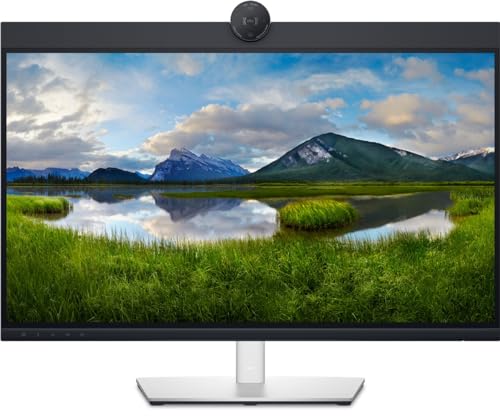
Dell 27 P27 Video Conference Monitor
Our score Overwhelmingly positive
What the listing highlights
- Service 1 year technical support
What to check on the listing
- No Prime badge on this listing.
- Sold by Aventis Systems; the listing does not show Amazon fulfilment.
Both columns are read from the Amazon product page. Nothing here comes from hands-on use.
Best for Professionals needing sharp QHD resolution
Pros
- Crisp 1440p resolution
- Expansive 27-inch canvas
- One-year technical support
Cons
- Glossy screen reflection
- Audio specs not detailed
Users seeking extra visual real estate can step up to the Dell 27 P27 Video Conference Monitor. This unit expands the visual canvas to 27 inches while upgrading screen fidelity to QHD Wide 1440p resolution across a 16:9 aspect ratio. The higher pixel density delivers sharper typography and lets you position application windows alongside incoming video streams. The listing specifies a glossy screen surface treatment and includes Dell 1-year technical support service to assist with operational queries.
This model serves remote professionals who manage dense data sets, design documents, or extensive email threads alongside conference meetings. The 1440p canvas eliminates the cramped feeling of smaller 1080p panels. It hands off to dedicated enterprise models like the C2722DE when workflows require certified hardware buttons or pop-up physical camera housings, as this listing focuses strictly on screen real estate and core resolution.

Model 03 of 04
Dell P3424WEB 34 Curved Video Conferencing
Our score Overwhelmingly positive
What the listing highlights
- Powerful webcam: Take center stage with a 2K QHD webcam that packs a punch. The large Sony STARVIS sensor is 29.5% larger than the previous model
- Look great in low light: Temporal (3D) and Spatial (2D) Noise Reduction automatically eliminates motion blur and grainy images in low light, while AI Auto Framing keeps you in the…
- Loud and clear: Collaborate like you’re there with built-in, dual echo cancellation mics and dual 5W speakers, strategically positioned at the top of the monitor for an immersive audio experience.
What to check on the listing
- No Prime badge on this listing.
- Sold by Aventis Systems; the listing does not show Amazon fulfilment.
Both columns are read from the Amazon product page. Nothing here comes from hands-on use.
Best for Power users needing ultrawide conferencing
Pros
- 2K Sony STARVIS webcam
- 90W USB-C power delivery
- Dual echo cancellation microphones
Cons
- Heavy 26.8-pound weight
- Requires wide desk space
The Dell P3424WEB 34 Curved Video Conferencing monitor delivers an expansive 34-inch ultrawide workspace with an ultrawide 21:9 aspect ratio. The display features a matte screen finish, 1000:1 contrast ratio, 300 cd/m² brightness, a 60 Hz refresh rate, and a 170-degree viewing angle. Visual comfort features include Dell ComfortView Plus, Low Blue Light technology, and a flicker-free panel. For collaboration, it integrates a 2K QHD webcam featuring a Sony STARVIS sensor that is 29.5 percent larger than previous generations. It adds 3D temporal and 2D spatial noise reduction, AI auto framing, dual echo-canceling microphones, and dual 5W speakers mounted along the top edge.
Designed for comprehensive connectivity, this dell usb-c video conferencing monitor functions as a hub using RJ45 Ethernet and USB-C with up to 90W Always On Power Delivery. It features two super speed 5Gbps USB 3.2 Gen1 ports, multi-OS support, a manual webcam shutter, microphone mute button, and certified Microsoft Teams touch controls. Recognized as the best dell monitor for zoom meetings due to official Zoom certification, this dell 34 inch curved monitor suits executives and power users who want an all-in-one communications center. It yields to smaller flat panels only when desk width is limited or when mounting arms cannot support its 26.8-pound overall weight.

Model 04 of 04
Dell Pro 24 Video Conferencing Monitor
Our score Overwhelmingly positive
What the listing highlights
- FULL HD IPS DISPLAY Features a 24-inch Full HD IPS panel delivering crisp, clear visuals with accurate colors and wide viewing angles.
- VIDEO CONFERENCING READY Built-in features optimized for video calls, making it ideal for remote work and virtual meetings.
- IMMERSIVE SCREEN SIZE The 24-inch display provides ample screen real estate for multitasking, presentations, and collaboration.
What to check on the listing
- No Prime badge on this listing.
- Sold by vCloudTech; the listing does not show Amazon fulfilment.
Both columns are read from the Amazon product page. Nothing here comes from hands-on use.
Best for Standard desktop PC video calling
Pros
- Clear Full HD IPS panel
- Versatile HDMI and DisplayPort
- Fast 5ms response time
Cons
- No USB-C power delivery
- Standard 24-inch workspace
The Dell Pro 24 Video Conferencing Monitor, cataloged under model number Dell E2426HB, delivers an efficient 23.8-inch display built around a Full HD IPS panel. The screen operates at a 1920 by 1080 resolution, offering sharp imagery and wide viewing angles suited for everyday productivity. Listing details emphasize video conferencing readiness, a rapid 5ms response time, and versatile connectivity options including HDMI, DisplayPort, and USB.
This model addresses the needs of home offices and study environments requiring straightforward plug-and-play operation with traditional desktop towers or standard laptop docks. The IPS panel ensures that colors remain consistent whether you are attending a group lecture or reviewing documents. It defers to higher-tier P-series or C-series displays when your setup demands single-cable USB-C power delivery or advanced sensor adjustments.
Also in this lineup
Dell 27 Video Conferencing Monitor
Best for Bright rooms requiring high visual contrast
Pros
- High 450 cd/m2 IPS Black
- DisplayHDR600 certified
- Matte glare-reducing finish
Cons
- Audio specs not listed
- Standard 60Hz refresh rate
Best for Windows Hello users and Teams meetings
Pros
- Pop-up 5MP IR camera
- 90W USB-C charging with RJ45
- Dedicated Microsoft Teams button
Cons
- Glossy screen finish
- Standard 60Hz refresh rate
Identified by model designation Dell C2722DE, the Dell 27 Video Conferencing Monitor features a 27-inch WQHD panel running at 2560 by 1440 resolution at 60 Hz. The display incorporates IPS panel technology, a 16:9 aspect ratio, a glossy finish, 350 nits of brightness, 1000:1 contrast, 6ms response time, and 178-degree viewing angles. Upgrading your workspace with this dell computer monitor 27 inch screen provides balanced dimensions and high visual sharpness for complex daily tasks.
Collaboration features include a pop-up 5MP IR camera providing Full HD 30 fps video, biometric facial recognition login via Windows Hello, and dual 5W integrated speakers. A dedicated Microsoft Teams button allows one-touch meeting access, while a single USB-C cable transmits audio, data, video, and delivers up to 90W of Always On Power Delivery alongside wired RJ45 Ethernet. This model suits corporate workers and home professionals invested in Windows ecosystem security. It gives way to matte-coated displays if your workstation sits directly opposite unfiltered ambient sunlight.
Also in this lineup
Dell 27 Video Conferencing Monitor
Referenced under model number Dell P2724DEB, this version of the Dell 27 Video Conferencing Monitor pairs a 27-inch screen with IPS Black Technology and an anti-glare matte surface. The display achieves a brightness rating of 450 cd/m², supports DisplayHDR600, operates at 60 Hz, and features an aspect ratio of 16:9. Dell integrates ComfortView Plus low blue light filtering, flicker-free operation, and automatic brightness and color temperature adjustments to adapt dynamically to office lighting.
The hardware includes an integrated webcam, a high contrast rating, a 170-degree viewing angle, and a built-in cable lock slot for workspace security. This model excels in brightly illuminated rooms where glare reduction and deep black levels are essential for creative work alongside meetings. Because it emphasizes high-contrast visual engineering and panel brightness over dedicated conferencing control buttons, users seeking physical Teams launch keys will favor the C2722DE instead.
Matching a Model to Your Setup
- Executive workstations requiring wide panoramic viewing and certified Zoom controls pair best with the Dell P3424WEB 34 Curved Video Conferencing monitor.
- Modern Windows laptops requiring biometric login via facial recognition and single-cable 90W charging match the Dell 27 Video Conferencing Monitor (C2722DE).
- Sunlit rooms where ambient light reflections wash out glossy screens benefit directly from the matte finish and 450 cd/m² brightness of the Dell 27 Video Conferencing Monitor (P2724DEB).
- General productivity users seeking 1440p resolution and backed by dedicated 1-year technical support should select the Dell 27 P27 Video Conference Monitor.
- Tight workspaces and secondary desks needing an efficient 1080p IPS screen with HDMI and DisplayPort inputs are well served by the Dell Pro 24 Video Conferencing Monitor (E2426HB).
- Compact remote work cubicles requiring standard Full HD resolution and rapid 5ms response times operate smoothly with the Dell 24 Video Conferencing Monitor (P2424HEB).
Before You Buy
A careful dell video conferencing monitor comparison shows noticeable variations in listing specifications across models. While higher-end units like the P3424WEB and C2722DE detail exact webcam sensor specs, speaker output wattages, and USB-C power delivery capacities, other product pages provide limited operational data. For example, listings for the P27 and P2724DEB do not specify exact speaker wattage ratings or microphone arrays, while the E2426HB listing highlights video call optimization without cataloging specific camera sensor dimensions.
Shoppers determining which dell video conferencing monitor to buy should also verify accessory inclusions and mounting requirements. Standard listings do not always outline which video cables, power adapters, or USB-C upstream cords are packaged inside the retail box. In addition, physical parameters such as the 26.8-pound weight of the 34-inch curved display require a heavy-duty desk clamp or a deep desktop surface that standard monitor arms may not accommodate.
FAQ
Which Dell video conferencing monitor includes a pop-up privacy webcam?
The Dell 27 Video Conferencing Monitor under model reference C2722DE features a pop-up 5MP IR camera that hides securely inside the chassis when not in use, while the P3424WEB uses an integrated camera with a manual physical privacy shutter.
Can a Dell video conferencing monitor charge my laptop during meetings?
Yes, specific models such as the Dell P3424WEB and Dell C2722DE provide USB-C connectivity with up to 90W Always On Power Delivery, allowing you to charge your laptop, transfer data, and output video using one cord.
Do all Dell video conferencing monitors feature built-in speakers?
The listings for the Dell P3424WEB and Dell C2722DE specifically confirm integrated dual 5W speakers, whereas listings for basic models like the P2424HEB and E2426HB do not detail internal audio wattage, meaning external sound gear or headphones may be beneficial.
What is the difference between glossy and matte screens on Dell conferencing monitors?
Glossy panels, found on models like the P2424HEB and C2722DE, deliver vibrant color perception but can reflect indoor lights, whereas matte finishes on models like the P3424WEB and P2724DEB diffuse ambient light to prevent distracting workplace glare.
Do these Dell monitors support facial recognition login?
The Dell 27 Video Conferencing Monitor (C2722DE) explicitly lists Windows Hello facial recognition support via its 5MP IR pop-up camera, allowing fast password-free login on compatible Windows operating systems.