The Best Samsung Curved Monitors for Family Work and Gaming
Choosing a curved monitor for a shared household workstation requires balancing several practical needs at once. Daily computer use in a busy family home often shifts rapidly between morning homework, afternoon remote office tasks, and evening gaming or streaming entertainment. A reliable curved screen can improve visual comfort by matching the natural geometry of human…
As Amazon Associates, we earn from qualifying purchases. This means we may receive a small commission at no extra cost to you if you click through and make a purchase.
Choosing a curved monitor for a shared household workstation requires balancing several practical needs at once. Daily computer use in a busy family home often shifts rapidly between morning homework, afternoon remote office tasks, and evening gaming or streaming entertainment. A reliable curved screen can improve visual comfort by matching the natural geometry of human vision, but picking the right display depends heavily on desk size, viewing distance, and how many windows need to be open simultaneously. Navigating this category means deciding whether a standard widescreen layout or a sprawling ultrawide format will best support your household without overwhelming your shared living space.
Samsung organizes its curved monitor collection into two distinct tiers that address different computing priorities. The Essential and S3 series focus on approachable everyday reliability, featuring gentle 1800R curvatures, standard 16:9 aspect ratios, and dedicated eye comfort modes engineered for document processing and general productivity. Moving up into the Odyssey series introduces high-performance gaming hardware, featuring expansive 21:9 and 32:9 aspect ratios, intense 1000R curves, and advanced display panels such as QD-OLED and high-resolution VA matrices. Reviewing a detailed samsung curved monitor comparison helps clarify where simple desktop utility ends and specialized gaming performance begins across this versatile catalog.
Samsung Curved Monitors Lineup at a Glance
| Model | Screen Size & Resolution | Curvature & Panel Type | Refresh Rate |
|---|---|---|---|
| Samsung 27″ Essential S3 | 27″ Full HD (1920×1080) | 1800R Curved LED | 100Hz |
| Samsung 32″ S3 | 32″ Full HD (1920×1080) | 1800R Curved VA | 100Hz |
| Samsung 34′ Odyssey G5 Ultra-Wide Gaming | 34″ WQHD (3440×1440) | 1000R Curved VA | 165Hz |
| Samsung 49″ Odyssey OLED G9 | 49″ Dual QHD (5120×1440) | Curved QD-OLED | 144Hz |
| Samsung 40” Odyssey G7 | 40″ WUHD (5120×2160) | 1000R Curved VA | 180Hz |
| Samsung S36GD 27″ Curved Monitor | 27″ Full HD (1920×1080) | 1800R Curved LCD/VA | 100Hz |
Figures in this table come from the write-up and the product pages it links to.
The Models in Detail
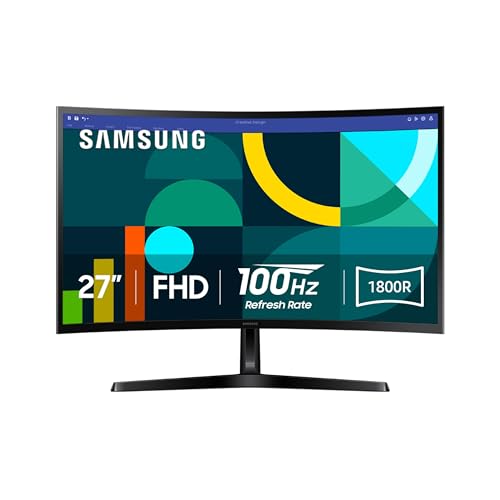
What the listing highlights
- CURVED FOR ENHANCED ENGAGEMENT An immersive viewing experience with a curved monitor that wraps more closely around your field of vision; It creates a wider view, enhancing depth perception and minimizing peripheral distraction
- SMOOTH PERFORMANCE FOR SEAMLESS CONTENT Stay in the action when playing games, watching videos, or working on creative projects; The 100Hz refresh rate reduces lag and motion blur so you don’t miss a thing in…
- MORE GAMING POWER Gain the edge with optimizable game settings; Color and image contrast can be adjusted to see scenes more vividly and spot enemies hiding in the dark; Game Mode adjusts any…
What to check on the listing
- No Prime badge on this listing.
Both columns are read from the Amazon product page. Nothing here comes from hands-on use.
Best for Everyday shared family computer desks
Pros
- 100Hz refresh rate
- 1800R visual comfort curve
- TÜV eye comfort certification
Cons
- Lacks built-in audio
- Modest 250 nit brightness
The Samsung 27″ Essential S3 is engineered for standard home desks that require an easy visual transition into curved display technology. Built around a 27-inch LED panel with a 16:9 aspect ratio, this model utilizes an 1800R screen radius that gently wraps the edges of the display into the user’s peripheral field of view. The Full HD resolution delivers clear visibility for reading text, managing household schedules, and browsing the web. With a 3,000:1 contrast ratio and 250 cd/m² brightness level, the screen presents clean separation between dark and light tones, making documents and streaming media comfortable to view throughout normal daylight hours.
Daily usability is reinforced by practical hardware features geared toward family health and occasional recreation. Samsung includes TÜV-certified eye comfort technology that mitigates screen flicker and actively filters blue light emissions to reduce eye fatigue during late-night study sessions. The panel steps above conventional office displays by providing a 100Hz refresh rate, ensuring fluid scrolling across long web pages and reducing motion blur during casual video games. An integrated Game Mode allows users to adjust color profiles and dark-area contrast quickly, providing an added visual lift when children switch from school assignments to evening entertainment.
This monitor is best suited for students and parents who need a durable, straightforward display that takes up minimal desktop space. Its total dimensions of 24.5 inches wide by 9.2 inches deep ensure it rests comfortably on compact study desks or within bedroom workspaces. However, households that plan to watch movies without headphones or lack dedicated desktop speakers will notice that this model does not list integrated audio, making the larger S3 series variant a logical step up for standalone media consumption.

What the listing highlights
- CURVED FOR ENRICHED ENGAGEMENT A truly immersive viewing experience. The curved monitor wraps closely around your field of vision to create a wider view that enhances depth perception. Minimizes peripheral distractions.
- SMOOTH PERFORMANCE FOR YOUR CONTENT Stay in the action when playing games, watching videos, or working on creative projects.¹ The 100Hz refresh rate reduces lag and motion blur so you don’t miss a thing in…
- MORE GAMING POWER Gain a competitive edge with optimizable game settings.² Color and image contrast can be instantly adjusted to see scenes more clearly and spot enemies hiding in the dark, filling the…
What to check on the listing
- No Prime badge on this listing.
Both columns are read from the Amazon product page. Nothing here comes from hands-on use.
Best for Multimedia viewing without desk speakers
Pros
- Integrated audio speakers
- Large 32-inch screen size
- 3000:1 contrast ratio
Cons
- FHD resolution on large screen
- Fixed 250 nit brightness
The Samsung 32″ S3 expands desktop visibility significantly by pairing a larger 32-inch VA panel with an 1800R curve and a non-glare matte screen finish. Retaining a standard 16:9 aspect ratio and Full HD resolution, this model prioritizes magnified text and effortless readability, which can be particularly advantageous for younger learners or older family members who prefer larger screen elements. The 3,000:1 contrast ratio ensures deep black levels, while the 178-degree horizontal and vertical viewing angles allow multiple family members to gather around the screen to review photos or watch instructional videos without chromatic distortion.
A notable functional addition on the Samsung 32″ S3 is the inclusion of built-in stereo speakers. Integrating audio directly into the display housing eliminates the clutter of external speaker boxes and extra power cords, which keeps shared home surfaces clean and orderly. Performance remains smooth across daily applications thanks to the 100Hz refresh rate and Game Mode settings, while certified Eye Saver Mode and flicker-reducing technology help maintain visual comfort during extended computer sessions. For shared family desks, this combination of integrated sound and eye protection makes it a capable all-in-one media and homework station.
This 32-inch display serves households that value simplified wire management and need a larger screen for split-screen homework or shared video viewing. Its physical footprint measures 28.2 inches wide and 10.3 inches deep, demanding a moderately larger desktop surface than 27-inch alternatives. While it excels at basic productivity and clutter-free audio, users seeking higher pixel density for fine photo editing or advanced gaming will find the ultrawide resolution of the Odyssey lineup more appropriate.

Model 03 of 06
Samsung 34' Odyssey G5 Ultra-Wide Gaming
Our score Mostly positive
What the listing highlights
- OPTIMAL CURVE, TRUE IMMERSION The all-encompassing 1000R display fills every part of your peripheral vision and draws you right into the character’s shoes; Experience a level of gaming more heart-pounding than ever before
- WQHD RESOLUTION The ultrawide WQHD monitor provides a seamless dual-monitor experience with a 1000R curvature that matches the human field of view, offering eye comfort for long gaming sessions
- SMOOTH TRANSITIONS This gaming monitor features a 165Hz refresh rate and 1ms (MPRT) response time, eliminating motion blur for a smooth, competitive gaming experience that gives you the winning edge
What to check on the listing
- No Prime badge on this listing.
- Sold by Server Technology; the listing does not show Amazon fulfilment.
Both columns are read from the Amazon product page. Nothing here comes from hands-on use.
Best for Immersive gaming and dual-window multitasking
Pros
- Sharp WQHD resolution
- Fast 165Hz refresh rate
- Tight 1000R curved radius
Cons
- 1ms MPRT response metric
- No integrated speakers specified
Moving into specialized performance, the Samsung 34′ Odyssey G5 Ultra-Wide Gaming transitions the workspace from standard 16:9 widescreen to an expansive 21:9 ultrawide format. This monitor features a sharp WQHD resolution of 3440×1440, offering substantial screen real estate that effectively replaces a clumsy dual-monitor arrangement. At the core of its design is an aggressive 1000R curved display surface, which closely matches the natural arc of the human field of view. Selecting a dedicated samsung 34 inch curved monitor like this allows parents to review wide spreadsheets on one half of the display while keeping communication tools or research tabs open on the other without a plastic bezel in the middle.
Under the hood, the G5 is built to deliver serious gaming credentials alongside its productivity advantages. The VA panel boasts a rapid 165Hz refresh rate and a 1ms Motion Picture Response Time (MPRT) that eliminates ghosting in competitive multiplayer titles. Integrated AMD FreeSync Premium handles adaptive synchronization, eliminating screen tearing and stutter by aligning panel cycles with the graphics card. Visual fidelity is elevated through HDR10 support, rendering lifelike colors and maintaining shadow details in both high-contrast gaming scenes and high-definition video streams.
This display is the ideal middle ground for households that split their computer time evenly between intensive remote work and modern PC gaming. The intense 1000R curve demands that the primary user sit directly in front of the center point for the best visual experience, making it less optimal for wide group viewing than the gentler 1800R screens. Users seeking even greater horizontal workspace or state-of-the-art contrast technology will naturally look toward Samsung’s flagship OLED options.

What the listing highlights
- DETAILED QD-OLED WORLDS LIVE ON A WIDER, VIBRANT SCREEN: With QD-OLED technology, enjoy a wider color spectrum & vibrant images that captivate you and take gaming to new heights; Content…
- WIN WITH A WIDER VIEW AND MORE PIXELS PER INCH: Don’t sacrifice detail, even with a larger screen.¹ The wide 32:9 screen in Dual QHD resolution and 110 pixels per…
- DIVE INTO SHADOWS WITH PURER BLACK LEVELS: Uncover every secret with infinite expression. See true black and dark colors on display without pixel light bleed for supreme color and depth…
What to check on the listing
- No Prime badge on this listing.
- Sold by Beach Camera Same Day Shipping; the listing does not show Amazon fulfilment.
Both columns are read from the Amazon product page. Nothing here comes from hands-on use.
Best for High-end panoramic creative workstations
Pros
- Vibrant QD-OLED panel
- Instant 0.03ms response time
- Massive 32:9 dual QHD area
Cons
- Requires large desk depth
- Burn-in mitigation features needed
The Samsung 49″ Odyssey OLED G9 represents an elite tier of desktop technology, packing an immense 32:9 super-ultrawide form factor into a single continuous screen. Boasting a Dual QHD resolution of 5120×1440 across its 49-inch curved frame, this monitor delivers 110 pixels per inch for razor-sharp clarity. The underlying QD-OLED display panel produces individual self-lit pixels, achieving an extraordinary 1,000,000:1 contrast ratio. Because individual pixels can switch off entirely, the screen achieves absolute black levels without light bleed, while VESA DisplayHDR True Black 400 certification provides vibrant, accurate color rendition across a 99 percent color gamut.
Speed and panel preservation are central to the operational design of the G9. The monitor achieves an astonishing 0.03ms gray-to-gray response time paired with a 144Hz refresh rate, supported by both AMD FreeSync Premium Pro and Nvidia G-Sync compatibility. To protect the premium display panel over years of daily family computing, Samsung integrated a multi-layered safeguard system. A thermal modulation algorithm monitors surface temperatures to regulate brightness, while intelligent taskbar and logo detection dims static interface elements to prevent image retention. Additionally, an automatic screen saver dims the display after ten minutes of inactivity to preserve panel health.
For high-end enthusiasts, digital content creators, and multi-tasking parents who require the equivalent of two seamless 27-inch QHD monitors side by side, exploring a samsung ultrawide 49 workstation offers unprecedented screen space. However, its expansive physical width requires a large, sturdy executive desk, and users primarily managing standard office documents may find its premium OLED capabilities more specialized than necessary for general household duties.

What the listing highlights
- Samsung’s 40” Odyssey G7 G75 WUHD 180Hz Curved Gaming Monitor provides breathtaking realism for epic gameplay.
- 40” 1000R curved display with a 21:9 screen and brilliant Ultrawide 4K resolution wraps around the field of vision for next-level gaming.
- VESA DisplayHDR 600 delivers more contrast, with deeper blacks and brighter whites for greater clarity even in dark scenes.
What to check on the listing
- No Prime badge on this listing.
Both columns are read from the Amazon product page. Nothing here comes from hands-on use.
Best for Spacious high-resolution productivity setups
Pros
- Brilliant WUHD 4K resolution
- Fluid 180Hz refresh rate
- DisplayHDR 600 brightness
Cons
- Substantial desk space footprint
- Deep 1000R screen curve
The Samsung 40” Odyssey G7 combines vast diagonal screen size with exceptional pixel fidelity, featuring an ultrawide 21:9 aspect ratio backed by WUHD resolution (5120×2160). This massive curved panel envelopes the viewer with an immersive 1000R curve, keeping distant corners easily readable without forcing excessive neck turning. The display is equipped with a luminous VA panel rated at 350 cd/m² and backed by VESA DisplayHDR 600 certification. This allows the monitor to deliver intense specular highlights and rich black levels, producing vivid clarity whether rendering complex video timelines or high-fidelity open-world gaming environments.
Engineered for high-bandwidth computing and fast-paced simulation, the 40-inch Odyssey G7 runs at an ultra-fast 180Hz refresh rate with a 1ms gray-to-gray response time. AMD FreeSync Premium Pro synchronization keeps demanding graphics completely fluid, while Picture-by-Picture capability allows users to display inputs from two distinct computers simultaneously on the same screen. This dual-source flexibility is especially useful in family homes where a work laptop and a personal desktop tower share a single workspace without requiring separate displays.
This monitor is tailored for power users who want maximum vertical and horizontal visual area without jumping to the extreme super-ultrawide 32:9 format. Its physical footprint measures 36.56 inches wide by 11.96 inches deep, requiring robust desk depth and solid desktop construction. If your desk space is limited or your daily computing consists mostly of basic web browsing and homework, this heavy-duty visual powerhouse will exceed standard family requirements.

Model 06 of 06
Samsung S36GD 27" Curved Monitor
Our score Overwhelmingly positive
What the listing highlights
- 27″ Vertical Alignment (VA) Panel – 1920 x 1080 Resolution – 250 cd/m² Brightness
- 4 ms response time – 1800R curvature – 100Hz refresh rate – VGA & HDMI inputs
- 3,000 1 Static Contrast Ratio – 178°/178° Viewing Angles
What to check on the listing
- No Prime badge on this listing.
- Sold by SQ Limited; the listing does not show Amazon fulfilment.
Both columns are read from the Amazon product page. Nothing here comes from hands-on use.
Best for Budget home office workstations
Pros
- Dual HDMI and VGA inputs
- Flicker-Free and Eye Saver tech
- 95 percent sRGB coverage
Cons
- No built-in camera
- Basic 4ms response time
The Samsung S36GD 27″ Curved Monitor delivers a dependable, budget-conscious foundation for home workstations, home classrooms, and secondary study areas. Featuring a 27-inch Vertical Alignment panel with Full HD (1920×1080) resolution, it presents standard widescreen proportions via an easy-viewing 1800R curvature. The screen achieves a 3,000:1 static contrast ratio alongside 250 cd/m² brightness and wide 178-degree viewing angles. Color reproduction is reliable for school projects and daily media, backed by 95 percent sRGB color gamut coverage supporting up to 16.7 million distinct hues.
Connectivity on this unit is exceptionally accommodating for both modern and older family computers. The rear connection panel includes standard HDMI alongside an analog VGA port, enabling direct connection to modern laptops or legacy desktop towers without needing specialized converter dongles. Operational comfort is handled through built-in Eye Saver Mode and Flicker-Free technology, while a 100Hz refresh rate and 4ms response time provide smooth visual tracking during fast cursor movement and casual gaming. A dedicated Game Mode optimizes picture contrast with a single button press.
This display is ideal for budget-focused family desks that prioritize essential connectivity and visual ergonomics over ultra-high refresh rates. The product listing explicitly clarifies that the monitor does not include an integrated camera, meaning virtual school meetings and remote work conferences will require an external USB webcam. For straightforward document processing and general home use, it provides dependable curved screen functionality at minimal complexity.
Matching a Model to Your Setup
- Compact bedroom or student homework desks: The Samsung 27″ Essential S3 fits tight desktop surfaces easily while providing 100Hz fluidity and eye comfort modes for long study sessions.
- Clutter-free shared family spaces: The Samsung 32″ S3 provides an expansive viewing surface along with built-in audio speakers, eliminating external speaker boxes and tangled desktop cables.
- Hybrid home office and enthusiast gaming: The Samsung 34′ Odyssey G5 Ultra-Wide Gaming provides sharp WQHD resolution for side-by-side spreadsheets alongside a rapid 165Hz gaming refresh rate.
- High-end creative studios and flight simulators: The Samsung 49″ Odyssey OLED G9 delivers peerless infinite contrast, 0.03ms response times, and an expansive 32:9 workspace for demanding multi-window power users.
- Dual-computer multi-tasking workstations: The Samsung 40” Odyssey G7 leverages Picture-by-Picture support and high-resolution WUHD clarity to manage two video inputs simultaneously.
- Mixed modern and legacy hardware desks: The Samsung S36GD 27″ Curved Monitor easily connects to modern PCs and older family towers via its combined HDMI and VGA input ports.
Before You Buy
Before finalizing your display choice, take time to evaluate the physical clearance and input specifications described in the product listings. The listings for several models, including the 27-inch Essential S3 and the 34-inch Odyssey G5, do not specify built-in audio speakers, requiring your family to rely on headphones or standalone desktop sound systems. Furthermore, the product listings for these displays do not include built-in webcams, with the Samsung S36GD explicitly noting that no camera is integrated. If your family relies heavily on video conferencing for remote school or work, budgeting for an external USB webcam will be necessary.
Physical desk space and port configurations also require verification against your existing hardware. While standard 27-inch and 32-inch models feature moderate footprints, large ultrawide displays like the 40-inch G7 and 49-inch OLED G9 measure over three feet wide and require nearly a foot of depth for their stand assemblies. The product data does not specify height-adjustment ranges or internal USB hub availability for several models in this lineup. Ensure your computer’s graphics output supports the native resolutions and refresh rates of these displays, particularly when stepping up to high-bandwidth formats like WQHD, WUHD, or Dual QHD.
FAQ
What is the difference between a 1000R and an 1800R curved monitor?
The number preceding the letter R indicates the radius of the display’s curve in millimeters. An 1800R monitor has a gentler curve based on an 1,800mm radius, making it subtle, easy to adapt to, and versatile for multiple viewers sitting near the desk. A 1000R monitor features a tighter curve based on a 1,000mm radius, closely matching human peripheral vision to provide deeper immersion for a single viewer seated directly in front of the screen.
Can a Samsung curved monitor be used for daily family productivity?
Yes, curved monitors are well suited for daily family office work, homework, and web browsing. The curved screen brings the outer edges of the display into your natural visual field, minimizing peripheral eye strain and neck movement. Features such as Eye Saver Mode, blue light filtration, and flicker-free technology further enhance viewing comfort during long work sessions.
Do these Samsung curved displays come with integrated speakers?
Not all models include built-in sound. In this lineup, the Samsung 32″ S3 explicitly features integrated speakers to save desk space. Other models, such as the 27″ Essential S3, the 34″ Odyssey G5, and the S36GD 27″ monitor, do not list integrated speakers, meaning sound must be routed through external desktop speakers or headphones.
Are Samsung curved monitors compatible with standard VESA desk mounts?
Specific mounting compatibility varies across the range. For example, the Samsung S36GD 27″ Curved Monitor specifically highlights VESA mount compatibility in its listing details, allowing it to attach to aftermarket monitor arms. For other models in the range, you should confirm individual mounting bracket patterns before purchasing third-party desk arms.
Which Samsung curved monitor is best for split-screen window management?
Ultrawide models with 21:9 or 32:9 aspect ratios provide the best screen real estate for split-screen multitasking. The Samsung 34′ Odyssey G5 provides a wide WQHD canvas that easily accommodates two full documents side by side. For users requiring maximum space, the 40″ Odyssey G7 and the 49″ Odyssey OLED G9 deliver massive resolutions that can replace dual-monitor setups entirely without any center bezel obstruction.


