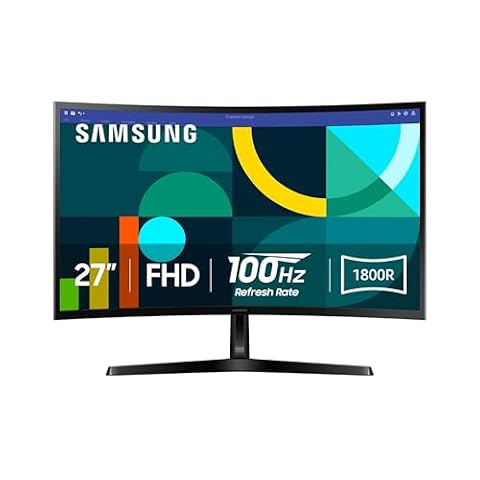
Samsung 49-Inch Ultrawide Monitor Guide: Comparing Top Work and Play Models
Choosing a 49-inch ultrawide monitor means moving past the physical clutter and center bezel of traditional dual-monitor desks in favor of a single panoramic screen. Shoppers must determine whether their setup prioritizes high-speed gaming fluidity, color-critical creative work, or remote office productivity. Selecting the right super-ultrawide display involves balancing curvature radius, panel technology, visual refresh…
As Amazon Associates, we earn from qualifying purchases. This means we may receive a small commission at no extra cost to you if you click through and make a purchase.
Choosing a 49-inch ultrawide monitor means moving past the physical clutter and center bezel of traditional dual-monitor desks in favor of a single panoramic screen. Shoppers must determine whether their setup prioritizes high-speed gaming fluidity, color-critical creative work, or remote office productivity. Selecting the right super-ultrawide display involves balancing curvature radius, panel technology, visual refresh capabilities, and docking connectivity to match the physical space and daily computing habits of your household.
Samsung structures its 49-inch display catalog across three clear user tiers. The Odyssey OLED lineup utilizes self-lit quantum dot panels to achieve infinite contrast, instant pixel responses, and specialized burn-in protection firmware for mixed gaming and multimedia. The Odyssey VA and QLED gaming models focus on peak luminance reaching up to 1000 nits, rapid 240Hz refresh rates, and deep 1000R curves built for fast action and flight simulations. Meanwhile, the Business Curved series centers on clean desk setups by integrating 90W USB-C laptop charging, a built-in KVM switch, internal speakers, and dedicated eye-care features. A detailed samsung ultrawide 49 comparison demonstrates how each screen targets specific desktop demands.
Samsung 49-inch Ultrawide Monitors Lineup at a Glance
| Model | Panel Type & Curvature | Refresh Rate & Response | Key Connectivity & Brightness |
|---|---|---|---|
| Samsung 49″ Odyssey OLED G9 | QD-OLED, Matte finish | 144Hz, 0.03ms (GtG) | 250 cd, DisplayHDR True Black 400, G-Sync & FreeSync |
| Samsung 49” Business Curved Ultrawide Dual | LED LCD, 1000R Curve | 120Hz, Matte finish | 400 cd/m², USB-C 90W, DisplayPort, 2x HDMI, KVM |
| Samsung 49” Odyssey G9 Series DQHD | VA LCD, 1000R Curve | 240Hz, 1ms (GtG) | 1000 cd peak, DisplayHDR 1000, FreeSync Premium Pro |
| SAMSUNG 49-inch Odyssey G9 | VA LCD, 1000R Curve | 144Hz, 1ms | 280 cd, DisplayHDR 600, FreeSync Premium Pro, PIP |
| Samsung 49″ Odyssey | QD-OLED, 1800R Curve | 240Hz, 0.03ms (GtG) | 250 cd, DisplayHDR True Black 400, HDMI 2.1, Speakers |
| SAMSUNG 49″ Odyssey G9 | QLED VA, 1000R Curve | 240Hz, 1ms (GtG) | 1000 cd peak, DisplayHDR 1000, Eye Saver Mode |
Figures in this table come from the write-up and the product pages it links to.
The Models in Detail

What the listing highlights
- DETAILED QD-OLED WORLDS LIVE ON A WIDER, VIBRANT SCREEN: With QD-OLED technology, enjoy a wider color spectrum & vibrant images that captivate you and take gaming to new heights; Content…
- WIN WITH A WIDER VIEW AND MORE PIXELS PER INCH: Don’t sacrifice detail, even with a larger screen.¹ The wide 32:9 screen in Dual QHD resolution and 110 pixels per…
- DIVE INTO SHADOWS WITH PURER BLACK LEVELS: Uncover every secret with infinite expression. See true black and dark colors on display without pixel light bleed for supreme color and depth…
What to check on the listing
- No Prime badge on this listing.
- Sold by Beach Camera Same Day Shipping; the listing does not show Amazon fulfilment.
Both columns are read from the Amazon product page. Nothing here comes from hands-on use.
Best for Bright spaces requiring maximum HDR luminance
Pros
- Massive 1000 nit peak brightness
- Fast 240Hz refresh rate
- Eye Saver Mode comfort tech
Cons
- Deep 1000R curve footprint
- Substantial 23.4-pound weight
Best for High-framerate gamers wanting a gentler curve
Pros
- Blistering 240Hz QD-OLED panel
- Gentler 1800R viewing curve
- HDMI 2.1 and integrated speakers
Cons
- USB hub lacks laptop charging
- Moderate 250 nit luminance
Best for Hybrid workers seeking OLED contrast and burn-in safeguards
Pros
- Rapid 0.03ms response time
- Deep QD-OLED contrast
- Automated logo and taskbar dimming
Cons
- Modest 250 nit brightness
- Limited to 144Hz refresh rate
The Samsung 49″ Odyssey OLED G9 (G91SD) brings QD-OLED panel technology to an expansive 32:9 dual QHD 5120 x 1440 canvas. Operating at 110 pixels per inch with a matte finish, this screen produces pure black levels and infinite color depth without backlight bleed, supported by a 1,000,000:1 contrast ratio and VESA DisplayHDR True Black 400 certification. Gaming motion remains exceptionally clear due to a 0.03ms response time and a 144Hz refresh rate backed by both G-Sync compatibility and AMD FreeSync Premium Pro.
To support everyday reliability in mixed-use homes, Samsung equips this model with several longevity-focused hardware protections. The Thermal Modulation System predicts surface temperatures to modulate luminance and reduce internal heat buildup. It also includes Logo and Taskbar Detection to automatically lower brightness on static interface elements, along with an automatic screen saver that dims the panel after 10 minutes of inactivity. These integrated systems address panel wear for users running productivity applications alongside evening entertainment.
This Samsung 49 Odyssey OLED G9 model is ideal for creative professionals, sim racers, and dark-room gamers who demand reference-grade black levels and rapid pixel response times. It gives way to brighter LED models if your workstation is positioned in an environment with high direct sunlight, where higher nit ratings are required. Users who need a more compact curved footprint for smaller desks can explore a samsung curve monitor to preserve workspace.

Model 02 of 05
Samsung 49” Business Curved Ultrawide Dual
Our score Mostly positive
What the listing highlights
- PANORAMIC PRODUCTIVITY Immerse yourself in enhanced productivity for all your projects; A 49″ 1000R curved display wraps around you with a 32:9 aspect ratio, closely matching your field of view. See and…
- A CLEAN WAY TO CONNECT A monitor and docking station in one; Tap into DisplayPort, 2 HDMI inputs, USB, and USB Type-C inputs that support 90W charging; Keep your desk less cluttered by using the…
- SMOOTHER SCROLLING, SEAMLESS VISUALS Take a break from work projects and enjoy gaming on a smoother screen; 120Hz refresh rate keeps screen running smoothly for a more immersive experience during gameplay and reduces lag…
What to check on the listing
- No Prime badge on this listing.
Both columns are read from the Amazon product page. Nothing here comes from hands-on use.
Best for Home offices needing single-cable USB-C docking
Pros
- USB-C with 90W charging
- Integrated KVM switch
- Built-in stereo speakers
Cons
- 120Hz refresh rate
- Standard 3000:1 contrast ratio
The Samsung 49” Business Curved Ultrawide Dual (LS49C954UANXZA) is engineered specifically as a multi-device desktop command center. It features a 49-inch LED LCD panel with an immersive 1000R curvature that matches the natural human field of view. The Dual QHD resolution provides ample horizontal space for expansive spreadsheets, research windows, and video timelines. A 120Hz refresh rate delivers smooth window scrolling, while VESA DisplayHDR 400 and a 3000:1 contrast ratio ensure comfortable readability across varied office lighting.
Connectivity is the centerpiece of this Samsung 49 Business Curved Ultrawide monitor. Operating as an integrated docking hub, it features DisplayPort, two HDMI ports, USB ports, and a USB Type-C port supplying 90W of device charging power. An integrated KVM switch allows users to toggle one keyboard and mouse setup across two connected computing sources. In addition, built-in stereo speakers eliminate the need for desktop sound bars, while dedicated eye-care technology reduces strain during extended work hours.
This model is the ideal choice for home-office professionals, financial analysts, and shared family workstations. Connecting a portable laptop or a samsung laptop for student coursework requires only a single USB-C cable for power, video, and peripherals. It yields to the dedicated Odyssey gaming line when competitive high-frame-rate gaming at 240Hz is the top priority for the room.

Model 03 of 05
Samsung 49” Odyssey G9 Series DQHD
Our score Very positive
What the listing highlights
- WRAP YOURSELF IN ADVENTURE Experience heart-pounding gaming with vivid scenes wrapped deeply around your field of view; The 49′ 1000R curved screen with Dual QHD resolution enables full peripheral vision and draws you in
- REVOLUTIONARY RESPONSE TIME Conquer every enemy with extreme speed; A 240Hz refresh rate eliminates lag for ultrasmooth action; 1ms(GtG)* response time allows for blur-free frames and minimized ghosting
- CATCH THE DETAIL, DEFEAT YOUR ENEMIES: From gloomy shadows to sun-scorched scenes, 1000 nit peak brightness and 1,000,000:1 contrast ratio enable enhanced color expression and depth
What to check on the listing
- No Prime badge on this listing.
Both columns are read from the Amazon product page. Nothing here comes from hands-on use.
Best for Competitive simulator drivers needing 240Hz speed
Pros
- Ultra-smooth 240Hz refresh rate
- Intense 1000 nit peak DisplayHDR 1000
- Immersive 1000R curvature
Cons
- No USB-C power delivery
- Requires deep desk space
The Samsung 49” Odyssey G9 Series DQHD (LS49CG954ENXZA) delivers an aggressive curved gaming experience powered by a 240Hz refresh rate and a 1ms gray-to-gray response time. Built around a 49-inch VA LCD display with a 1000R curve, it completely fills peripheral vision to place the player directly inside the action. AMD FreeSync Premium Pro synchronization keeps dynamic scenes fluid and prevents frame tearing during rapid competitive movements.
High dynamic range performance on this screen reaches 1000 nit peak brightness with VESA DisplayHDR 1000 certification, backed by a 1,000,000:1 contrast ratio. The exterior features Samsung CoreSync and Core Lighting+, projecting real-time on-screen game colors onto the wall behind the monitor to deepen ambient immersion. Ergonomic positioning is handled by the Hexa stand, which supports swivel, tilt, and height adjustments alongside standard VESA mounting compatibility.
This Samsung 49 Odyssey G9 DQHD monitor fits dedicated competitive simulation and flight enthusiasts who require fluid motion and bright HDR highlights. Multitasking is supported by Picture-by-Picture (PBP) and Picture-in-Picture (PIP) for secondary inputs, along with Auto Source Switch+ for rapid signal detection. It gives way to QD-OLED models only when absolute ink-like black levels in dim rooms are preferred over maximum daylight brightness.

What the listing highlights
- WRAP YOURSELF IN GREATER DETAIL Immerse yourself in a panoramic gaming experience with a 1000R curved display. This ultra-wide 32:9 screen, equivalent to two side-by-side 16:9 monitors, delivers a full view of your enemies so…
- EXPLORE HIDDEN DETAILS IN THE SHADOWS: Reveal the whole picture. DisplayHDR 600 delivers more contrast, with deeper blacks and brighter whites, so details shine with clarity even in the darkest…
- MINIMIZED LAG FOR MORE WINS Rank up in fast-paced games with ease.¹ The 144Hz refresh rate and 1ms response time reduce lag and capture your moves, so you can game with ultra-smooth action.
What to check on the listing
- No Prime badge on this listing.
Both columns are read from the Amazon product page. Nothing here comes from hands-on use.
Best for Everyday family setups balancing homework and gaming
Pros
- VESA DisplayHDR 600 contrast
- Fluid 144Hz FreeSync Premium Pro
- Flexible Picture-in-Picture multitasking
Cons
- 280 nit brightness rating
- Stand lacks swivel adjustment
The SAMSUNG 49-inch Odyssey G9 (LS49FG910ENXZA / G91F) serves as a well-balanced super-ultrawide display designed for smooth everyday play and split-screen workflows. It features a 1000R curved VA LCD panel with Dual QHD resolution in an ultra-wide 32:9 aspect ratio. A 144Hz refresh rate, 1ms response time, variable refresh rate (VRR), and AMD FreeSync Premium Pro keep visual motion crisp without requiring high-end PC hardware to reach maximum framerates.
Visual output is supported by VESA DisplayHDR 600, a 1,000,000:1 contrast ratio, 280 cd typical brightness, and 0.99 color gamut coverage. Multitasking is straightforward on this model, offering split-screen capability alongside Picture-in-Picture to place guides or video calls over primary windows. Auto Source Switch+ automatically engages new devices as soon as they power on, avoiding manual menu navigation.
This monitor is well-suited for families seeking a dependable samsung 49 inch gaming monitor that handles office tasks and casual gaming with equal stability. Its ergonomic stand provides tilt and height adjustments for daily comfort. It gives way to the 240Hz Odyssey models for esports enthusiasts who require maximum refresh headroom. Desktops with narrower footprints may find a samsung 34 inch curved monitor easier to accommodate.
Also in this lineup
Samsung 49" Odyssey
The Samsung 49″ Odyssey (G93SC) merges QD-OLED technology with a 240Hz refresh rate and a 0.03ms response time. Featuring an 1800R curvature, this Dual QHD display wraps gently across your visual field, providing wide viewing angles and reduced edge distortion compared to tighter curves. With DisplayHDR True Black 400 and HDR10+ support, it achieves deep shadow detail and pure blacks without light bleed across high-contrast scenes.
The exterior features a slim metal profile paired with an ergonomic height-adjustable stand. Built-in speakers provide direct audio output to save desk space, while CoreSync and Core Lighting+ match rear ambient lighting to displayed action. Input connections include high-bandwidth HDMI 2.1, DisplayPort, and a USB hub for peripheral data transmission, stabilized by G-Sync compatibility and AMD FreeSync Premium Pro.
This monitor suits simulation enthusiasts and gamers who want top-tier motion performance on an OLED panel with a wider, gentler curve. The 1800R radius makes side-by-side family viewing comfortable. It gives way to dedicated office models for telecommuting, as its USB hub supports data transmission only rather than laptop power delivery, and its 250 cd typical brightness is best tailored for moderate to low ambient room lighting.

What the listing highlights
- HANDPICKED BY AMAZON They did the research so you don’t have to.
- WRAP YOURSELF IN ADVENTURE Experience the next level of gaming with vivid scenes wrapped around your field of view. The 49″ 1000R curved screen with Dual QHD resolution enables full peripheral vision, putting you…
- LIGHTENING-FAST RESPONSE TIME Conquer every enemy with extreme speed. A 240Hz refresh rate eliminates lag for ultra-smooth action. 1ms(GtG)* response time allows for blur-free frames and minimized ghosting, enabling you to game with…
What to check on the listing
- No Prime badge on this listing.
- Sold by Amazon Resale; the listing does not show Amazon fulfilment.
Both columns are read from the Amazon product page. Nothing here comes from hands-on use.
The SAMSUNG 49″ Odyssey G9 (LS49CG950ENXZA / G95C) pairs QLED color technology with a high-speed VA panel to maximize visual intensity. The 1000R curve and Dual QHD resolution fill peripheral vision completely. Featuring a 240Hz refresh rate, a 1ms response time, and AMD FreeSync Premium Pro, this screen keeps fast-moving competitive scenes smooth, sharp, and free from ghosting artifacts.
High-brightness capability is the signature strength of this model, producing 1000 cd peak brightness alongside VESA DisplayHDR 1000 and a 1,000,000:1 dynamic contrast ratio. This enables vibrant highlights that remain clearly visible even in rooms with bright overhead lighting. Advanced eye comfort technology and Samsung Eye Saver Mode reduce blue light strain, while the Hexa stand supports swivel, tilt, and height adjustments on a sturdy footprint.
Equipped with Picture-by-Picture, Picture-in-Picture, and CoreSync rear lighting, this display provides a versatile setup for shared media spaces and simulator rigs. It gives way to the QD-OLED lineup when zero light bleed and perfect black levels in dark environments take precedence over daylight luminance. Shoppers comparing wider formats to mid-sized screens can consult a samsung odyssey 40 inch comparison to weigh desktop space requirements.
Matching a Model to Your Setup
- For home offices with USB-C laptops: Choose the Samsung 49” Business Curved Ultrawide Dual for its 90W single-cable charging, built-in KVM switch, integrated speakers, and 1000R comfort.
- For competitive gaming in darker rooms: Select the Samsung 49″ Odyssey (G93SC) for its blisteringly fast 240Hz refresh rate, 0.03ms QD-OLED response, and gentler 1800R curve.
- For hybrid telecommuting with OLED picture quality: Pick the Samsung 49″ Odyssey OLED G9 (G91SD) to enjoy pure blacks alongside thermal modulation and logo detection burn-in safeguards.
- For sun-drenched family rooms and bright gaming spaces: Go with the SAMSUNG 49″ Odyssey G9 (G95C) to cut through ambient light with its intense 1000 nit peak DisplayHDR 1000 panel.
- For balanced everyday entertainment and schoolwork: Opt for the SAMSUNG 49-inch Odyssey G9 (G91F) for dependable 144Hz performance, DisplayHDR 600, and convenient Picture-in-Picture multitasking.
Before You Buy
Before bringing a 49-inch ultrawide monitor into your home, measure your desk surface carefully. These displays span approximately 45 inches in width, and models with aggressive 1000R curves require substantial desk depth—often between 16 and 22 inches when mounted on their factory stands. Furthermore, these monitors carry significant physical heft, with several units weighing over 23 pounds. If you plan to use an aftermarket monitor arm, verify that it supports both standard VESA mounting patterns and heavy ultrawide weight thresholds, as the product listings do not specify bundled mounting adapters.
Check your computer hardware and port specifications before finalizing a purchase. Running a samsung dual qhd 49 monitor at 5120 x 1440 resolution at 144Hz or 240Hz requires a modern graphics card equipped with DisplayPort 1.4 or HDMI 2.1 bandwidth. Additionally, while the Business Curved model provides 90W USB-C laptop charging, gaming listings do not specify laptop power delivery over USB, with the G93SC explicitly noting that its USB hub supports data transmission only. Ensure your setup includes compatible high-speed cables to match your desired refresh rate.
FAQ
Can a 49-inch ultrawide replace two 27-inch monitors?
Yes. A 49-inch 32:9 Dual QHD display matches the exact physical width, height, and pixel resolution of two 27-inch 2560 x 1440 monitors placed side by side. It provides this visual area without a center bezel dividing your workspace.
What is the difference between a 1000R and an 1800R curve?
The number indicates the curvature radius in millimeters. A 1000R curve is tighter, wrapping more deeply around your field of view for immersion at close desk distances. An 1800R curve is more gradual, offering a flatter perspective that works well for wider viewing angles and shared screen viewing.
Which Samsung 49-inch monitor is best for laptop work?
The Samsung 49” Business Curved Ultrawide Dual is best suited for laptop setups because its USB Type-C port provides 90W power delivery, transmitting video, data, and power over a single cable while supporting dual computers via an integrated KVM switch.
How do Samsung QD-OLED monitors protect against image retention?
Samsung includes multiple firmware safeguards on models like the Samsung 49″ Odyssey OLED G9. These include a Thermal Modulation System to manage surface heat, Logo and Taskbar Detection to dim static visual elements, and an automatic screen saver that dims the screen after 10 minutes of inactivity.
Can I view two separate computers on the screen at the same time?
Yes. Samsung models featuring Picture-by-Picture (PBP) allow you to display two independent video sources side by side in their native resolutions, enabling samsung ultrawide split screen productivity across work laptops, desktops, and gaming consoles.