The Best 27-Inch Dell Monitors Compared for Everyday Home and Work Use
Finding the right dell computer monitor 27 inch requires balancing screen clarity, stand ergonomics, panel speed, and connectivity. At 27 inches, a display provides a generous workspace for household productivity, school assignments, and casual evening entertainment without overwhelming a standard desk. Buyers evaluating this category typically face choices between Full HD (1080p) and Quad HD…
As Amazon Associates, we earn from qualifying purchases. This means we may receive a small commission at no extra cost to you if you click through and make a purchase.
Finding the right dell computer monitor 27 inch requires balancing screen clarity, stand ergonomics, panel speed, and connectivity. At 27 inches, a display provides a generous workspace for household productivity, school assignments, and casual evening entertainment without overwhelming a standard desk. Buyers evaluating this category typically face choices between Full HD (1080p) and Quad HD (1440p) resolutions, basic tilt stands versus multi-directional ergonomic bases, and standard HDMI inputs versus modern single-cable USB-C connections. Refresh rates also span widely across the catalog, from everyday 75Hz panels up to rapid 240Hz screens built specifically for fast-paced motion.
Dell organizes its 27-inch monitor lineup primarily across its Essential (SE) and Lifestyle (S) series, distinguishing models by functional priorities. The SE tier focuses on straightforward, space-saving designs with tilt adjustments and high-performance panel speeds suited for value-oriented workstations and budget gaming. The lifestyle S and S Plus tiers introduce family-friendly conveniences, such as four-way adjustable stands, integrated stereo speakers, textured rear enclosures, and advanced TÜV Rheinland eye comfort ratings. If you are also considering smaller desk configurations, looking at dell monitors 24 inch can help you decide whether a compact form factor or a 27-inch canvas better suits your room. A detailed dell 27 monitor comparison clarifies how each model addresses specific household needs.
Dell 27-Inch Monitors Lineup at a Glance
| Model | Resolution | Refresh Rate | Stand Adjustments | Audio |
|---|---|---|---|---|
| Dell 27 Monitor (SE2726H) | 1920×1080 FHD | 144Hz | Tilt | None specified |
| Dell 27 Plus Monitor (S2725HSM) | 1920×1080 FHD | 144Hz | Height, Tilt, Swivel, Pivot | Integrated Dual 3W Speakers |
| Dell 27 Plus QHD Monitor (S2725DSM) | 2560×1440 QHD | 144Hz | Height, Tilt, Swivel, Pivot | Integrated Dual 3W Speakers |
| Dell 27 240Hz Gaming Monitor (SE2726HG) | 1920×1080 FHD | 240Hz | Tilt | None specified |
| Dell S2725HS 27 Inch Monitor | 1920×1080 FHD | 100Hz | Height, Tilt, Swivel, Pivot | Integrated Dual 5W Speakers |
| Dell S2722DC Monitor | 2560×1440 WQHD | 75Hz | Height, Tilt, Swivel, Pivot | Integrated Speakers |
Figures in this table come from the write-up and the product pages it links to.
The Models in Detail

What the listing highlights
- Clear visuals. Fluid motion: A 144Hz refresh rate and 1ms MPRT deliver smooth, tear‑free motion across work, gaming, and streaming for clearer, more fluid viewing.
- Eye comfort: TÜV Rheinland 3‑star* certification reduces harmful blue light while preserving stunning color quality without compromise. *TÜV Rheinland 3-star eye comfort certification.
- Wide viewing angle: Get consistent views across a wide 178° /178° viewing angle.
What to check on the listing
- No Prime badge on this listing.
Both columns are read from the Amazon product page. Nothing here comes from hands-on use.
Best for Budget-conscious family desktop setups
Pros
- 144Hz refresh rate with 1ms MPRT
- IPS wide viewing angles
Cons
- Tilt-only stand adjustment
- 72 percent color gamut coverage
The Dell 27 Monitor serves as an accessible entry point into the brand’s 27-inch display catalog. Known in product specifications as the dell 27 monitor se2726h, this screen combines a Full HD 1920×1080 resolution with an In-Plane Switching panel. Despite its positioning as an everyday display, Dell equips it with a fluid 144Hz refresh rate and a 1ms MPRT response time, backed by AMD FreeSync technology to prevent screen tearing during fast motion.
With an aspect ratio of 16:9, a matte screen finish, 300 nits of brightness, and 72 percent color gamut coverage, this monitor delivers dependable visual clarity for reading, document editing, and video streaming. Its physical connectivity features two HDMI ports, allowing users to keep two source devices connected simultaneously, such as a desktop tower and a streaming device. The physical chassis uses ultra-thin bezels to maximize the visible screen area, though the included stand is limited strictly to forward and backward tilt adjustments.
This model is best suited for families seeking a dependable, no-frills display for shared homework, web browsing, and casual computing where desk space requires a compact footprint. However, users who require physical height adjustment, wider sRGB color coverage, or integrated desktop speakers will want to step up to the S series models in Dell’s catalog.

What the listing highlights
- Elevated entertainment: The QHD resolution and 1500:1 contrast ratio bring astounding depth and vivid detail, while a 144Hz refresh rate and 1ms Moving Picture Response Time (MPRT) deliver a smooth,…
- Hear the audio difference: Immerse yourself in sound with integrated dual 3W speakers delivering a wider range of frequencies.
- Eye comfort: Prioritize visual comfort with this 4-star TÜV-certified display. Reduce harmful blue light emissions while maintaining stunning image quality without compromising colors.
What to check on the listing
- No Prime badge on this listing.
Both columns are read from the Amazon product page. Nothing here comes from hands-on use.
Best for Home office multitaskers needing crisp text
Pros
- Sharp QHD 2560×1440 resolution
- 1500:1 contrast ratio
- Fully adjustable ergonomic stand
Cons
- No USB-C power delivery

What the listing highlights
- Elevated entertainment: The FHD resolution and 1500:1 contrast ratio bring clarity, while a 144Hz refresh rate, and 1ms Moving Picture Response Time (MPRT) deliver a smooth, tear-free viewing experience.
- Hear the audio difference: Immerse yourself in sound with integrated dual 3W speakers delivering a wider range of frequencies.
- Eye comfort: Prioritize visual comfort with this 4-star TÜV-certified display. Reduce harmful blue light emissions while maintaining stunning image quality without compromising colors.
What to check on the listing
- No Prime badge on this listing.
Both columns are read from the Amazon product page. Nothing here comes from hands-on use.
Best for Everyday multimedia and flexible home workstations
Pros
- Height, tilt, pivot, and swivel stand
- Integrated dual 3W speakers
Cons
- FHD 1080p resolution on 27 inches
The Dell 27 Plus Monitor elevates everyday family computing by focusing on ergonomics, integrated audio, and higher visual contrast. Listed under the dell 27 plus monitor s2725hsm model designation, this unit features a 27-inch 1080p FHD panel paired with an upgraded 1500:1 contrast ratio that enhances depth in darker scenes. It maintains the responsive 144Hz refresh rate and 1ms MPRT seen on the baseline SE series, paired with AMD FreeSync to eliminate visual stutter across video playback and casual gaming.
One of the primary advantages of this model is its physical versatility and lifestyle design. Finished in Ash White, it incorporates a fully adjustable stand offering height, tilt, swivel, and pivot articulation, letting multiple family members customize their viewing angle easily. Sound is handled by integrated dual 3W speakers designed to produce a wider frequency range, eliminating the need for standalone desktop speakers.
This display is ideal for multi-user family desks and general work-from-home tasks where physical adjustability and built-in audio simplify desktop clutter. Those who frequently handle dense spreadsheets, photo editing, or fine typography will find the step up to a higher pixel density model like the QHD version worthwhile.
Also in this lineup
Dell 27 Plus QHD Monitor
The Dell 27 Plus QHD Monitor addresses the primary limitation of large 1080p screens by increasing the resolution to 2560×1440 Quad HD. Sold under the model name dell 27 plus qhd monitor s2725dsm, this display delivers a pixel pitch of 109 pixels per inch on an IPS panel, producing significantly sharper text rendering and expanded desktop workspace. When deciding which dell 27 inch monitor to buy for intensive reading and office tasks, this higher resolution offers an immediate clarity advantage over 1080p counterparts.
In addition to its sharp resolution, this dell 27 inch 1440p monitor features a 144Hz refresh rate, 1ms MPRT, and AMD FreeSync support, matching the motion performance of Dell’s faster entertainment displays. Visual specifications include a 1500:1 contrast ratio, 350 nits of brightness, a matte screen finish, and 99 percent color gamut coverage. Connectivity includes both HDMI and DisplayPort 1.4 inputs.
For parents and professionals looking for the best dell 27 inch monitor for home office productivity, this model provides the sharpest balance of pixel density, eye comfort, and fluid performance. It stands as the top recommendation for productivity within Dell’s standard HDMI and DisplayPort collection, conceding ground only to dedicated docking monitors that feature integrated USB-C power delivery.
What the listing highlights
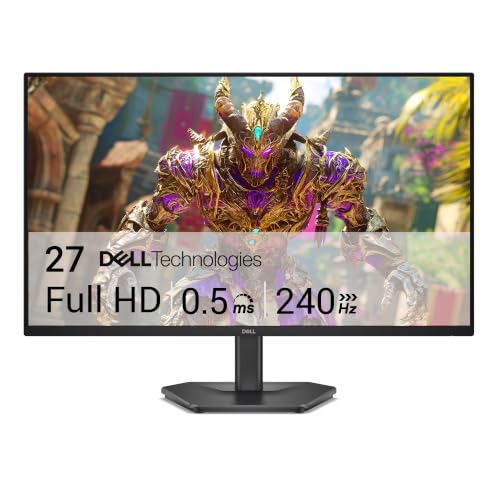
- Smooth motion: 240Hz refresh rate and fast 0.5ms response time provide crisp visuals and fluid movement with less input lag.
- Seamless gaming: FreeSync Premium and HDMI VRR eliminate tearing for smooth, responsive PC and console gameplay.
- Fast IPS Faster 0.5ms response with excellent color accuracy across wide IPS viewing angles.
What to check on the listing
- No Prime badge on this listing.
Both columns are read from the Amazon product page. Nothing here comes from hands-on use.
Best for Competitive family gaming and fast action
Pros
- 240Hz refresh rate and 0.5ms response
- AMD FreeSync Premium and HDMI VRR
- 99 percent sRGB color gamut
Cons
- Stand only adjusts for tilt
- Standard FHD resolution
The Dell 27 240Hz Gaming Monitor focuses squarely on high-speed motion clarity and competitive family entertainment. Operating under the model code dell 27 240hz gaming monitor se2726hg, this screen upgrades the standard refresh rate to a rapid 240Hz and shortens the response time to a fast 0.5ms on an In-Plane Switching panel. Dell equips this model with AMD FreeSync Premium and HDMI Variable Refresh Rate (VRR) technology to eliminate frame tearing and reduce input latency across both PC rigs and connected gaming consoles.
The panel provides a Full HD 1920×1080 resolution, a 1000:1 contrast ratio, 300 nits of brightness, and 99 percent sRGB color gamut coverage, ensuring accurate color rendering from wide 178-degree viewing angles. Input ports include two HDMI ports and a DisplayPort 1.4 connection, providing flexible connectivity across multiple source machines.
This monitor is specifically built for households with enthusiastic gamers who prioritize motion fluidity, rapid frame delivery, and low input lag over higher pixel density. Because its stand offers tilt-only adjustability and does not include built-in speakers or USB connectivity, users prioritizing desktop ergonomics or single-cable laptop docking should look toward the S series alternatives.

What the listing highlights
- ComfortView Plus Reduce blue light emissions without sacrificing color accuracy with TUV Eye Comfort 4-star rated Dell’s Improved ComfortView Plus.
- Vibrant visuals: Enjoy consistent color and clarity with 99% sRGB color coverage and 1500:1 contrast ratio, while a 100Hz refresh rate delivers more seamless scrolling and smoother motion.
- Comfort from every angle: Tilt, swivel, pivot and adjust the height of your monitor to match any activity, in any space.
What to check on the listing
- The listing reads as carrying a Prime badge.
Both columns are read from the Amazon product page. Nothing here comes from hands-on use.
Best for Casual entertainment with enhanced desktop sound
Pros
- Integrated dual 5W speakers
- Full height, tilt, swivel, and pivot stand
Cons
- 100Hz refresh rate lower than newer models
The Dell S2725HS 27 Inch Monitor combines lifestyle design with an emphasis on enhanced acoustic performance and daily eye care. Its visual presentation is supported by a 100Hz refresh rate, a 1500:1 contrast ratio, 300 nits of brightness, and 99 percent sRGB color coverage for vivid and stable viewing.
Where this dell s2725hs 27 inch monitor distinctively separates itself is its built-in audio system. While other models in the lineup feature 3W drivers or no speakers at all, this display features integrated dual 5W speakers re-engineered with deeper frequency response, greater output power, and an expanded decibel range. The exterior styling features an Ash White finish with a subtle Japanese sand-raking pattern across the rear casing, complemented by a fully articulated stand that supports height, tilt, swivel, and pivot adjustments. Dual HDMI ports allow quick switching between casual gaming and media streaming.
This model is tailored for shared bedrooms, dorm rooms, or family spaces where built-in sound clarity is essential for watching movies, attending virtual classes, or casual gaming without tethering headphones or desktop speakers. For users whose primary concern is text sharpness for spreadsheet work, the 1440p S2725DSM or S2722DC remain superior options.

What the listing highlights
- Versatile connectivity: Easily charge and connect your laptop with USB-C connectivity and 65W of power delivery. This single-cable solution reduces cable clutter for a clutter-free desktop and transmits power, video,…
- Perfect ports: Charging and connecting your storage devices, mobile phones and other peripherals just got easier with a conveniently placed, quick-access USB 3.2 Gen 1 Type-A port.
- Comfort comes first: Customize your views with height-adjustable stand, tilt, swivel & pivot features.
What to check on the listing
- No Prime badge on this listing.
Both columns are read from the Amazon product page. Nothing here comes from hands-on use.
Best for Laptop users wanting single-cable USB-C docking
Pros
- USB-C with 65W power delivery
- Crisp 1440p QHD display resolution
- Full ergonomic stand adjustability
Cons
- 75Hz maximum refresh rate
- 4ms response time
The Dell S2722DC Monitor provides a streamlined, clutter-free solution tailored specifically for modern laptop setups. Operating as a dedicated dell s2722dc usb c monitor, its standout feature is a USB Type-C connection supporting 65W of power delivery. This single cable transmits video, audio, data, and device charging simultaneously, transforming the display into an efficient hub that charges a connected laptop while driving the screen. It also includes a conveniently placed, quick-access USB 3.2 Gen 1 Type-A port for flash drives and mobile phone charging.
Visually, the screen offers a crisp WQHD 2560×1440 resolution on an IPS panel, delivering 350 nits of brightness, a 1000:1 contrast ratio, 99 percent sRGB color gamut coverage, and wide 178-degree viewing angles. It supports leisure gaming through AMD FreeSync technology with a 75Hz refresh rate and a 4ms response time. Physical ergonomics are fully supported by an articulated stand capable of height, tilt, swivel, and pivot adjustments, wrapped in a Platinum Silver casing with a three-sided ultrathin bezel. Users can also arrange open windows and software applications across the screen using Dell Easy Arrange.
This monitor is the ideal match for work-from-home households where users frequently dock and undock modern USB-C laptops and demand clean cable management. While larger workstations might tempt some buyers toward an ultra-wide dell 34 inch curved monitor, this 27-inch 1440p screen offers an organized, high-resolution desktop without demanding massive surface space.
Matching a Model to Your Setup
- For single-cable laptop docking and home offices: Choose the Dell S2722DC Monitor for its 65W USB-C charging, integrated USB Type-A port, sharp 1440p resolution, and full ergonomic stand.
- For competitive PC and console gameplay: Pick the Dell 27 240Hz Gaming Monitor, which offers a 240Hz refresh rate, 0.5ms response time, AMD FreeSync Premium, and HDMI VRR.
- For family entertainment and virtual learning with built-in audio: Opt for the Dell S2725HS 27 Inch Monitor to benefit from its powerful dual 5W speakers, 100Hz refresh rate, and full stand adjustability.
- For everyday multimedia on an adjustable stand: Go with the Dell 27 Plus Monitor for its smooth 144Hz motion, dual 3W speakers, and flexible height, tilt, pivot, and swivel stand.
Before You Buy
Before selecting a 27-inch Dell display, consider the specific video outputs on your computer and the physical placement of your desk. The listings for these displays do not specify the exact cable types included in every packaging box, meaning you may need to supply your own high-speed HDMI, DisplayPort, or USB-C cable to match your machine. Furthermore, while models like the S2722DC provide USB-C video transmission and 65W power delivery, standard models such as the SE2726H and SE2726HG rely exclusively on HDMI and DisplayPort inputs and cannot power a laptop through a single connection.
It is also important to evaluate stand mechanics and mounting options. The SE series models include stands that only tilt backward and forward, lacking height adjustability, rotation, or swivel features. While the listings highlight ergonomic movement on the S series models, they do not specify whether VESA wall-mount hardware or adapter plates are supplied in the box. If you plan to mount your display on an articulated monitor arm or place it in a tight shared family workspace, verify the mounting dimensions and clearance before finalizing your purchase.
FAQ
Is a 1080p resolution sharp enough for a 27-inch monitor?
A 1080p Full HD resolution on a 27-inch monitor provides a pixel density of roughly 81 to 82 pixels per inch. This density works well for video streaming, casual gaming, and everyday family tasks, but individual pixels and text smoothing may be visible when sitting close. For detailed office work, spreadsheet analysis, and fine photo editing, 1440p QHD displays like the Dell 27 Plus QHD Monitor offer noticeably crisper text and greater desktop workspace.
What is the difference between TÜV 3-star and TÜV 4-star eye comfort certification?
Both certifications verify that the display reduces harmful blue light emissions and provides flicker-free viewing.
Can I charge my laptop directly from these Dell monitors?
Only the Dell S2722DC Monitor features USB Type-C connectivity with 65W power delivery, allowing it to charge compatible laptops over a single cable while transmitting video, audio, and data. The other models in this roundup rely on standard HDMI or DisplayPort connections and do not supply charging power to connected host computers.
Do all of these Dell 27-inch monitors include built-in speakers?
No, built-in speakers are only included on select models. The Dell S2725HS 27 Inch Monitor features integrated dual 5W speakers, the Dell 27 Plus Monitor and Dell 27 Plus QHD Monitor include dual 3W speakers, and the Dell S2722DC Monitor includes built-in speakers. The Dell 27 Monitor and Dell 27 240Hz Gaming Monitor do not have integrated speakers listed in their specifications.
Can these monitors be adjusted for height?
Height adjustment is available on the Dell 27 Plus Monitor, Dell 27 Plus QHD Monitor, Dell S2725HS 27 Inch Monitor, and Dell S2722DC Monitor, all of which feature stands supporting height, tilt, swivel, and pivot adjustments. In contrast, the Dell 27 Monitor and Dell 27 240Hz Gaming Monitor feature stands that only adjust for tilt.