Which LG Tandem OLED Monitor Offers the Best Long-Term Value?
When selecting a desktop display for a shared family home, finding a panel that delivers stunning picture clarity without wearing out under heavy daily use is paramount. Exploring the lg tandem oled ecosystem introduces households to screens built with stacked organic light-emitting architectures, engineered specifically to enhance brightness and preserve panel lifespan better than older…
As Amazon Associates, we earn from qualifying purchases. This means we may receive a small commission at no extra cost to you if you click through and make a purchase.
When selecting a desktop display for a shared family home, finding a panel that delivers stunning picture clarity without wearing out under heavy daily use is paramount. Exploring the lg tandem oled ecosystem introduces households to screens built with stacked organic light-emitting architectures, engineered specifically to enhance brightness and preserve panel lifespan better than older single-layer designs. Families face choices between standard aspect ratios that excel at competitive gaming and homework, and expansive ultrawide formats that streamline document multitasking. Choosing the best lg tandem oled display means balancing screen size, pixel density, refresh rates, and daily usability across diverse household tasks.
The current range of lg ultragear oled monitors is organized around distinct screen sizes, resolution targets, and refresh rate technologies. LG structures this lineup into compact 27-inch flat panels for fast reaction times, an expansive 39-inch curved ultrawide for immersive productivity, and a versatile 32-inch 4K option featuring Micro Lens Array+ technology. Furthermore, select models function as an lg dual mode oled monitor, toggling between sharp visual fidelity and extreme frame rates at the touch of a button. Comparing these models simplifies your lg tandem oled comparison to determine which lg tandem oled to buy for your household workstation.
LG OLED Monitors Lineup at a Glance
| Model | Display Size and Format | Resolution and Maximum Refresh | Panel Architecture |
|---|---|---|---|
| LG 27GX700A-B | 27-inch Flat (16:9) | QHD (2560 x 1440) at 280Hz | Primary RGB Tandem OLED |
| LG 39GX950B-B | 39-inch Curved (21:9, 1500R) | 5K2K (5120 x 2160) at 165Hz / WFHD at 330Hz | 4th Gen Primary RGB Tandem OLED |
| LG 27GX790B-B | 27-inch Flat (16:9) | QHD at 540Hz / HD at 720Hz | 4th Gen Primary RGB Tandem OLED |
| LG 32GX870A-B | 32-inch Flat (16:9) | 4K UHD (3840 x 2160) at 240Hz / FHD at 480Hz | OLED with Micro Lens Array+ |
Figures in this table come from the write-up and the product pages it links to.
The Models in Detail
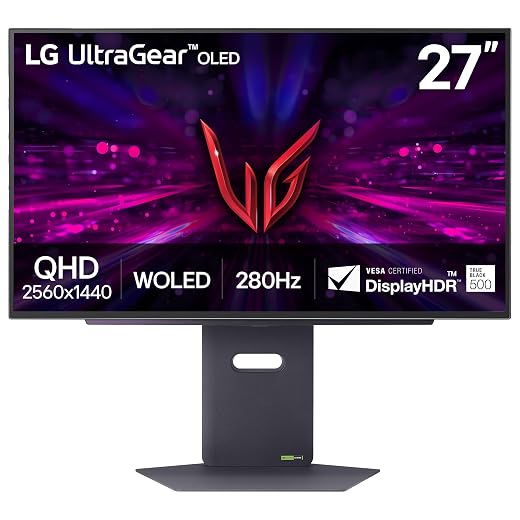
Model 01 of 04
LG 27GX700A-B 27-inch Ultragear QHD
Our score Mostly positive
What the listing highlights
- LG’s Brightest OLED Gaming Monitor – Experience the brightness and speed of 4th Gen OLED on a vivid 27″ QHD display—engineered for ultra-smooth, tear-free gameplay. With up to a 280Hz…
- Our Brightest, Boldest OLED Gaming Monitor – Powered by UltraGear’s latest OLED with Primary RGB Tandem tech, this is LG’s brightest OLED gaming monitor yet—reaching up to 1500 nits for…
- VESA DisplayHDR True Black 500 – VESA DisplayHDR True Black 500 certification ensures incredible brightness, rich contrast, and deep black levels. This OLED monitor enhances your gaming and streaming with…
What to check on the listing
- No Prime badge on this listing.
- Sold by Oriental Fuchsia Shop; the listing does not show Amazon fulfilment.
Both columns are read from the Amazon product page. Nothing here comes from hands-on use.
Best for Everyday family productivity and fast QHD gaming
Pros
- Primary RGB Tandem brightness
- Up to 280Hz refresh rate
- UL-verified color fidelity
Cons
- Fixed single refresh rate mode
- Modest 27-inch screen size
The LG 27GX700A-B 27-inch Ultragear QHD serves as the foundational tandem entry in LG’s gaming lineup, bringing 4th Generation Primary RGB Tandem technology into a traditional 16:9 desktop format. The listing specifies a 26.5-inch viewable QHD (2560 x 1440) panel with a native 280Hz refresh rate and a rapid 0.03ms response time. Tandem construction allows this panel to reach up to 1500 nits of peak brightness and 335 nits typical brightness. Enhanced Average Picture Level and reduced Auto Brightness Limiter keep critical visuals clear during bright scenes. It features VESA DisplayHDR True Black 500, a 1,500,000:1 contrast ratio, 99.5% DCI-P3 color coverage, and a matte anti-glare finish.
Desktop utility is enhanced by UL-verified visual performance, ensuring Perfect Black and Perfect Color with 100% Color Fidelity in bright or dim rooms. Daily usability is managed through the LG Switch app, which lets users customize hotkeys, split the screen into 11 distinct window layouts, and launch video calls quickly. Smooth gaming is supported by NVIDIA G-SYNC compatibility and AMD FreeSync Premium Pro. For private listening, the display includes a 4-pole headphone jack combining stereo sound and microphone input with DTS Headphone:X spatial audio.
This model suits households needing a space-efficient lg tandem oled monitor that fits easily on shared family desks for school assignments and fast gaming. Its standard 27-inch size integrates neatly into compact rooms without dominating available workspace. However, it gives way to the 39-inch ultrawide for multi-window productivity and to the 32-inch 4K model for maximum text sharpness.

Model 02 of 04
LG 39GX950B-B 39-inch Ultragear evo 5K2K
Our score Mostly positive
What the listing highlights
- The World’s First 39″ 5K2K OLED Gaming Monitor – This 39-inch 5K2K (5120×2160) UltraGear hits the sweet spot of size, resolution, and speed. The wide 21:9 format and 1500R curve…
- AI Upscaling to 5K2K—No GPU Upgrade Required – UltraGear evo’s built-in processor uses AI Upscaling to enhance content toward the display’s 5K2K resolution. It analyzes the source signal to improve…
- Next-Gen Brilliance with 4th Gen RGB Tandem OLED – 4th Gen Primary RGB Tandem OLED delivers up to 335 nits typical brightness with improved power efficiency. Its advanced 4-stack RGB…
What to check on the listing
- No Prime badge on this listing.
- Sold by APLCOMO; the listing does not show Amazon fulfilment.
Both columns are read from the Amazon product page. Nothing here comes from hands-on use.
Best for Creative multitaskers and ultrawide simulation gamers
Pros
- Expansive 5K2K curved canvas
- Integrated AI upscaling processor
- Dual-mode 165Hz and 330Hz flexibility
Cons
- Requires substantial desk depth
- Curved format not for drafting
The LG 39GX950B-B 39-inch Ultragear evo 5K2K expands the visual canvas into an ultrawide 21:9 format with an immersive 1500R curve. Billed as the world’s first 39-inch 5K2K OLED gaming monitor, it features 4th Gen Primary RGB Tandem OLED technology with an advanced 4-stack RGB structure delivering 335 nits typical brightness with improved power efficiency. The 5120 x 2160 resolution yields a sharp 143 PPI pixel density—providing over 30% more pixels than a standard 32-inch 4K screen. Contrast is rated at 1,500,000:1 with VESA DisplayHDR True Black 500 and 99.5% DCI-P3 color accuracy.
A core asset of this monitor is its VESA Certified Dual-Mode capability, letting users toggle between 5K2K resolution at 165Hz for visual immersion and Wide Full HD at 330Hz for high-speed competitive play. An onboard AI Upscaling processor analyzes source signals to sharpen content toward 5K2K without burdening your computer graphics card. Families comparing wide workstation layouts with other desk setups like a samsung ultrawide 49 display will appreciate that the 39-inch 21:9 format preserves vertical screen height for documents while saving horizontal desk space.
This ultrawide suits home office professionals and simulation gamers who require expansive timeline workspace alongside deep contrast. Multiple browser windows, research documents, and communication tools can sit side by side on one seamless screen. It gives way to the 27-inch models for compact workstations and to flat panels for users who prefer non-curved geometry for architectural drafting.

Model 03 of 04
LG 27GX790B-B 27” Ultragear QHD
Our score Mostly positive
What the listing highlights
- Outrageous Speed with LG’s Brightest OLED Gaming Monitor – Experience the brightness and speed of 4th Gen OLED on a vivid 27″ QHD display—engineered for ultra-smooth, tear-free gameplay. With a…
- Our Brightest, Boldest OLED Gaming Monitor – Powered by UltraGear’s latest OLED with Primary RGB Tandem tech, this is LG’s brightest OLED gaming monitor yet—reaching 335 nits typical brightness for…
- Next-Gen OLED Brilliance – 4th Gen Primary RGB Tandem OLED reaches 335 nits typical brightness while using less power than previous UltraGear OLED generations. The display’s advanced 4-stack RGB structure…
What to check on the listing
- No Prime badge on this listing.
Both columns are read from the Amazon product page. Nothing here comes from hands-on use.
Best for Hardcore esports competitors demanding maximum speed
Pros
- Extreme 720Hz Dual-Mode speed
- DisplayPort 2.1 and USB-C connectivity
- Lightning-fast 0.02ms response time
Cons
- HD mode drops visual resolution
- Higher performance demands on hardware
The LG 27GX790B-B 27” Ultragear QHD is engineered for competitive esports players who demand extraordinary responsiveness combined with tandem panel longevity. Powered by 4th Gen Primary RGB Tandem OLED technology with a 4-stack RGB structure, it achieves 335 nits typical brightness while using less power than earlier generations. Its primary innovation is Dual Mode operation, which lets users switch via a hotkey between QHD resolution at 540Hz and HD resolution at an unprecedented 720Hz.
The panel features an ultra-fast 0.02ms gray-to-gray response time to minimize reverse ghosting. Next-generation connectivity includes DisplayPort 2.1 to handle ultra-high refresh bandwidth, alongside dual HDMI 2.1 ports and a USB-C port for single-cable display output. The monitor carries UL-verified Perfect Reproduction certification to faithfully render game content across lighting conditions. Tear-free playback is ensured by NVIDIA G-SYNC compatibility and AMD FreeSync Premium Pro, supported by VESA DisplayHDR True Black 500 contrast.
This display suits tournament gamers and enthusiasts seeking the fastest possible refresh rate and future-proof DisplayPort 2.1 connectivity. It yields to the 27GX700A-B for value-focused families who do not need 540Hz or 720Hz speeds, and to the 32-inch 4K screen for households prioritizing daily text reading over competitive frame rates.

Model 04 of 04
LG 32GX870A-B 32-inch Ultragear 4K UHD
Our score Overwhelmingly positive
What the listing highlights
- Dual Mode 4K UHD 240Hz or Full HD 480Hz – LG UltraGear OLED is a VESA Certified Dual Mode gaming monitor. This innovation allows gamers to experience graphically rich, story-driven games in…
- Leave Lag Behind with 0.03ms Response Time – Enjoy smoother scenes with less lag or ghosting thanks to LG UltraGear OLED’s nearly instantaneous 0.03ms (GtG) response time.
- NVIDIA G-SYNC Compatible and AMD FreeSync Premium Pro – Officially validated by NVIDIA as G-SYNC Compatible and equipped with AMD FreeSync Premium Pro means this UltraGear provides smooth, fast action…
What to check on the listing
- No Prime badge on this listing.
- Sold by Video & Audio Center – Same Day Shipping; the listing does not show Amazon fulfilment.
Both columns are read from the Amazon product page. Nothing here comes from hands-on use.
Best for Households seeking sharp 4K text and versatile gaming
Pros
- Crisp 4K UHD 240Hz Dual-Mode
- Built-in stereo speakers
- Ergonomic pivot and height stand
Cons
- Lower typical brightness at 275 nits
- Uses MLA+ instead of RGB Tandem
The LG 32GX870A-B 32-inch Ultragear 4K UHD combines high-resolution desktop clarity with competitive gaming flexibility. Unlike its tandem siblings, this 32-inch flat panel uses Micro Lens Array+ (MLA+) OLED technology, delivering 275 nits typical brightness and up to 1300 nits peak brightness. With a 3840 x 2160 4K UHD resolution and a tight 0.18mm pixel pitch, it delivers sharp text rendering for productivity. A matte anti-glare, low-reflection finish minimizes room reflections during daylight family use.
Dual-Mode functionality allows gamers to toggle between native 4K UHD at 240Hz for graphical adventures and Full HD at 480Hz for competitive play via hotkey. The screen is certified for VESA DisplayHDR True Black 400 with a 1,500,000:1 contrast ratio and 98.5% color gamut coverage. Integrated stereo speakers deliver bass-driven desktop audio, while a 4-pole headphone jack provides DTS Headphone:X 3D audio. Families setting up multimedia desks alongside an lg home theater system in the living room get a complete self-contained audio-visual workstation here. The monitor features DisplayPort 2.1, dual HDMI 2.1, and USB Type-C connectivity on a fully adjustable ergonomic stand.
This model suits shared family workstations needing sharp 4K text for remote office tasks alongside high-framerate gaming. It gives way to the 39-inch ultrawide for multi-window creative timelines and to the 27-inch tandem models for smaller desks. When compared with broader desktop alternatives like a 4k gaming monitor samsung option, LG’s hotkey-driven 480Hz Full HD mode offers unmatched versatility on a single panel.
Matching a Model to Your Setup
- The High-Paced Family Esports Desk: Choose the LG 27GX700A-B 27-inch Ultragear QHD if your family workstation has limited depth and requires an ultra-fast 280Hz refresh rate, compact 16:9 geometry, and robust tandem brightness for daily mixed use.
- The Expansive Home Office and Creative Suite: Select the LG 39GX950B-B 39-inch Ultragear evo 5K2K when your desk accommodates a 1500R curved chassis and you need seamless 21:9 ultrawide multitasking, onboard AI upscaling, and crisp 143 PPI detail for long editing timelines.
- The Dedicated Competitive Tournament Rig: Opt for the LG 27GX790B-B 27” Ultragear QHD if you demand bleeding-edge speed, offering Dual-Mode toggling between 540Hz QHD and 720Hz HD, a 0.02ms response time, and next-generation DisplayPort 2.1 connectivity.
- The Balanced All-in-One 4K Productivity Hub: Pick the LG 32GX870A-B 32-inch Ultragear 4K UHD for households needing razor-sharp text clarity for daily reading and document tasks, integrated stereo speakers, and flexible Dual-Mode switching between 4K 240Hz and Full HD 480Hz.
- The Streamlined Single-Cable Workstation: Connect either the LG 27GX790B-B 27” Ultragear QHD or the LG 32GX870A-B 32-inch Ultragear 4K UHD if your setup relies on modern USB-C docking and DisplayPort 2.1 to keep shared desk cabling uncluttered.
Before You Buy
When evaluating these displays, buyers should carefully review specifications that are not explicitly detailed in the manufacturer product listings. While LG highlights tandem panel longevity, enhanced APL algorithms, and UL-verified color stability across these listings, the product descriptions do not specify the exact duration or specific coverage terms of the manufacturer warranty regarding potential image retention or burn-in over multi-year periods. Families planning extensive daily use with static productivity windows should verify warranty terms directly with authorized retailers before purchase.
Additionally, the listings do not specify the exact power delivery wattage provided over the USB Type-C connections on the models that feature them, leaving it unclear whether connected family laptops will receive sufficient charging power during intensive tasks. The listings also omit the specific transmission bandwidth classes (such as UHBR mode ratings) for the DisplayPort 2.1 ports, as well as the exact lengths and certifications of the video cables supplied inside the box. Households with deep desks or monitor arm configurations may need to purchase certified high-speed cables separately to ensure full refresh rate functionality.
FAQ
What is an lg tandem oled monitor and how does it improve durability?
A tandem OLED monitor utilizes an advanced multi-stack organic light-emitting architecture—such as the 4-stack Primary RGB Tandem tech featured in LG’s 4th Generation panels—layering emissive structures to distribute electrical load. By sharing the brightness burden across multiple stacks, the panel achieves high peak and typical brightness levels (up to 335 nits typical) with greater electrical efficiency. This architectural approach reduces heat stress on individual organic layers, mitigating the risk of premature luminance degradation and image retention during prolonged productivity sessions.
How does an lg dual mode oled monitor function during everyday use?
An LG dual-mode OLED monitor incorporates hardware-level resolution and refresh switching accessible via a dedicated monitor hotkey. On models like the 32GX870A-B, users can operate in native 4K UHD at 240Hz for sharp text and visually rich gaming, or switch instantly to Full HD at 480Hz for ultra-low-latency esports. The 39GX950B-B switches between 5K2K at 165Hz and WFHD at 330Hz, while the 27GX790B-B toggles between QHD at 540Hz and HD at 720Hz. This eliminates the need for separate monitors for work and competitive gaming.
What is the practical difference between RGB Tandem OLED and MLA+ technology?
In LG’s display hierarchy, Primary RGB Tandem OLED uses stacked emissive layers to improve brightness, color reproduction, and longevity across the 27-inch and 39-inch models. In contrast, the Micro Lens Array+ (MLA+) architecture used on the 32GX870A-B utilizes microscopic lenses placed over the OLED subpixels to focus and boost light output toward the viewer. Both technologies achieve high peak luminance (up to 1300 to 1500 nits) while mitigating heat, but tandem displays achieve higher typical full-screen brightness ratings of 335 nits compared to 275 nits on the MLA+ panel.
Do these monitors require a high-end graphics card to run smoothly?
Running native resolutions at maximum refresh rates—such as 4K at 240Hz, 5K2K at 165Hz, or QHD at 540Hz—requires a capable graphics card equipped with modern DisplayPort 2.1 or HDMI 2.1 connections. However, both NVIDIA G-SYNC compatibility and AMD FreeSync Premium Pro ensure smooth, tear-free performance even when your frame rate fluctuates below maximum refresh speeds. Additionally, the 39GX950B-B features an onboard AI Upscaling processor that enhances lower-resolution content toward 5K2K clarity directly on the display, reducing GPU load.
Which LG tandem OLED monitor provides the clearest text for shared family homework and office work?
For shared family productivity where reading documents and spreadsheets is a primary focus, the LG 39GX950B-B 39-inch Ultragear evo 5K2K and the LG 32GX870A-B 32-inch Ultragear 4K UHD deliver the clearest visual experience. With a 143 PPI pixel density on the 39-inch ultrawide and a fine 0.18mm pixel pitch on the 32-inch 4K panel, fine fonts and interface icons appear crisp and well-defined, overcoming the fringing issues historically associated with lower-density OLED screens.


